

Somewhere in your contact center is a customer who’s been on hold for 15 minutes and an agent who can’t find the latest policy agreement. They’ve searched Google Drive, Teams, and email, pinged a senior colleague on Slack, and are now skimming through a 12-page document while the customer fumes.
Eventually, they guess, send the customer on their way, but find out later the answer was wrong. Average handle time spikes, customer satisfaction takes a plunge, and a compliance investigation is underway.
If you’re wondering how to improve call center agent performance, you’ve probably read articles telling you to host more coaching sessions and set up leaderboards. None of them point you to the real problem: knowledge access.
Your call agents aren’t keeping customers on hold or giving wrong answers because they need another three-week training. They’re juggling back-to-back calls with impatient customers and not enough time to find the right answers. At that rate, poor performance is inevitable.
If you can help your agents access the right information faster, their performance will improve and so will customer satisfaction.
Here are six ways to do it:
- Train Your Agents With Daily Five-Minute Scenario Drills
- Build Decision Maps for Your Highest-Error Processes
- Run Failure Labs, Not Just QA Reviews
- Route by Issue Complexity, Not Just Topic
- Stop Relying on Tribal Knowledge
- Invest in a Purpose-Built Knowledge Management System.
The Real Reason Agent Performance Stalls
According to Deloitte Digital’s 2024 Global Contact Center Survey, 76% of 600 call center leaders say their agents are overwhelmed by the volume of information and systems they have to navigate. Just check forums like Reddit, Quora, G2, and you’ll confirm this.
You’ll see agents queried for giving customers wrong answers or keeping them on hold too long. But the real culprit is that these agents can’t access the right information fast enough during live calls. Here’s how that typically plays out:
Scattered Knowledge Access
The information call agents need are rarely centralized. It’s scattered across CRMs, a shared drive, and a product admin system agents have to toggle between per call. This leads to long wait times, lowered customer satisfaction (CSAT), and in some cases higher call back rates.
One Redditor complained that her call center’s knowledge library was spread across four different platforms. Despite a hectic three-week training, she found it difficult to navigate, and often left customers on hold searching for answers.
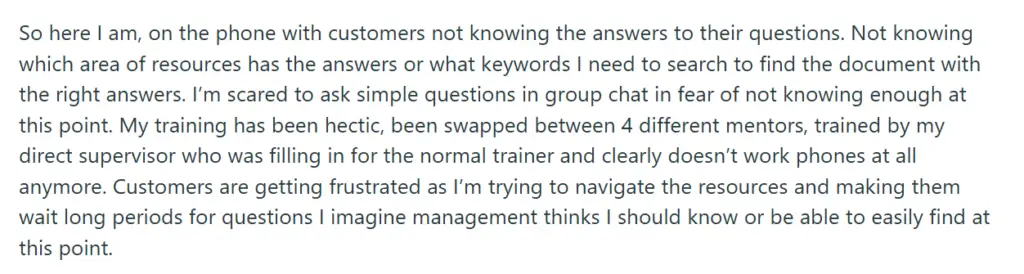
Because of this, her performance suffered, and so did customer satisfaction.
Information Silos
Your agents are less likely to deliver timely, accurate answers if relevant data lives in disconnected silos, rather than a single hub. Different departments end up with separate knowledge libraries with no clear access for agents.
For example, patient data is restricted to the clinical team. If a patient asks why their procedure hasn’t been scheduled, the agent can’t help them. The answer exists in an isolated library they can’t access, so they transfer the call or ask the patient to follow up later. When this happens, first call resolution (FCR) drops and repeat contact rates rise.
Tribal Knowledge Dependency
Most contact centers have agents who’ve been on the team for 5 to 6 years, each accumulating years of undocumented knowledge. They could be the go-to source for a specific fee waiver exception or healthcare policy.
When they’re unavailable, queries related to their field of expertise are put on hold or scheduled for a follow-up. Sometimes, the covering agent might guess instead of waiting, and get the answer wrong.
This is a risky position for your contact center to be in. US contact center attrition averaged 31% in 2023, according to ContactBabel’s 2024 Decision-Makers’ Guide. This means a real share of your workforce, and everything they know that was never written down, will be gone within the year.
Outdated Processes
Agents are more prone to give wrong, compliance-risky answers if there’s no clear distinction between updated and outdated process documents.
Take a debt collection disclosure script. Federal law requires agents to read specific wording, word for word, on every call. When compliance updates it, someone creates a new article instead of editing the old one, which never gets archived. It just stays live, ranking first in search, with no version label to tell them apart.
An agent opens that top result and reads the outdated document to the customer. Technically, they did their jobs right. But if a dozen other agents are pulling the same article, that’s a pattern of non-compliant disclosures, exactly what examiners flag in an audit.
The Pattern Behind All Four
Whichever of these plays out in your contact center, the outcome is the same. Average handle times (AHT) rise, FCR drops, and CSAT falls, no matter how much you invest in coaching. These are symptoms of a knowledge access gap, not undertrained agents.
189 US contact center managers were asked what would most improve agent performance. They ranked knowledge management first, ahead of a unified desktop, agent empowerment, and incentives. Only 9% picked more training, according to ContactBabel.
Your agents’ knowledge shouldn’t be scattered across platforms, siloed by department, dependent on one colleague’s memory, or buried in an outdated article. If you want to know how to improve call center agent performance, fix the access problem first, everything else follows.
How to Improve Call Center Agent Performance: 6 Strategies for Success
Now that you know the root cause, here are six ways to close the knowledge gap, starting with what you can implement today.
#1: Train Your Agents With Daily Five-Minute Scenario Drills
The average call agent needs 6 to 8 months to perform at the level of a skilled agent, typically through quarterly training. On paper, this looks like a good idea, but agents end up memorizing tons of policy, which they tend to forget under the pressure of a live call. The better approach is to replace seasonal learning with daily micro-drills.
Before daily work, agents pair up to practice one unique scenario per day. This ensures the first time agents encounter an issue isn’t during a high-stakes live customer interaction. They have the freedom to get it wrong and figure out how to handle issues fast and accurately.
This approach is backed by learning science. Distributed practice consistently beats one long, massed session for retention, especially over longer time gaps, according to a 2025 University of Melbourne meta-analysis. Agents remember better and build muscle memory for unique cases. New hires also ramp up faster than with a lengthy onboarding they’ll forget five months into the job.
#2: Build Decision Maps for Your Highest-Error Processes
What issues do agents get wrong most often? Maybe the steps are buried in documents they have to read mid-call. Maybe they’re working from memory, mixing up steps and giving customers the wrong advice. You can fix this with a flow chart or decision tree that guides agents through the process step by step, live.
Take an insurance BPO where fee waivers are the highest-error process. Agents have to remember six qualifying conditions live on a call. Mix up any one, and the resolution’s incorrect. A visual map replaces that with one question at a time, each answer determining the next step.
“Is this the customer’s first fee waiver request in 12 months?” If no, the map asks whether they have hardship documentation on file, and branches again from there.
This reduces errors drastically, since agents don’t have to work from memory anymore.
#3: Run Failure Labs, Not Just QA Reviews
A typical quality assurance (QA) process involves a manager scoring a handful of calls each month. Score badly enough, and it goes on the agent’s record. This has real flaws. Out of a hundred calls, a review might cover ten, forming a picture of performance from a small sample.
And once a write-up affects someone’s employment, agents stop volunteering the calls where they struggled. Those problems keep repeating, unreported, until they become a compliance issue.
Keep write-ups for worst-cases. Give agents room to ask for help instead. Schedule a monthly session where agents bring their own worst calls for discussion with no penalties attached. This surfaces cases that usually get swept under the rug.
If several agents keep giving the same wrong answer, you might discover they’re all relying on an undocumented shortcut. Agents won’t admit to that under threat of a write-up. Take the threat away, and you can actually find the pattern and fix it before it repeats.
#4: Route by Issue Complexity, Not Just Topic
Contact centers usually route calls by topic. You could have a queue for tech support, another for billing, and so on. This puts a junior agent and a five-year veteran on the same queue. The newbie may end up handling a multi-step compliance exception, and the veteran gets something as simple as an address update.
So, route calls by complexity, not just topic. Complex issues get the expertise of the experienced agents, while the newbies handle simpler tasks they can actually manage well. It also works as an indirect morale booster for junior agents, since their early call history fills with wins instead of failed calls that shake their motivation.
#5: Stop Relying on Tribal Knowledge
Your best agents shouldn’t just be the ones who’ve been around long enough to accumulate a ton of undocumented knowledge. No agent should need a senior colleague on the phone to handle a call, and no part of your contact center should depend on one person staying employed there.
Fix this by documenting the exceptions, workarounds, and edge cases your most experienced agents know so every other agent can access it.
#6: Invest in a Purpose-Built Knowledge Management System
Contact centers are struggling with the sheer volume of policies and programs agents need to navigate, according to Tim McDougal, service excellence lead at Deloitte Digital. “We’re throwing so much information at them, and asking them to diagnose and solve more complex issues,” McDougal told CX Dive in 2024.
That tracks with what we’ve covered so far. Agents hop between tools, dig through lengthy policy documents, or lean on experienced colleagues, because the information they need isn’t available during the call itself.
A centralized knowledge management system fixes this. Instead of scattering documentation across wikis, drives, and PDFs, it puts everything in one searchable hub agents can pull from mid-call.
ME Bank’s agents once dug through a dense, disorganized internal wiki just to answer one call. That changed after they moved to livepro, a centralized knowledge base. 39% of staff said finding information was now easy, and average handle time fell from 10 minutes to 6, a 40% reduction.
How livepro Helps Call Centers Improve Agent Performance
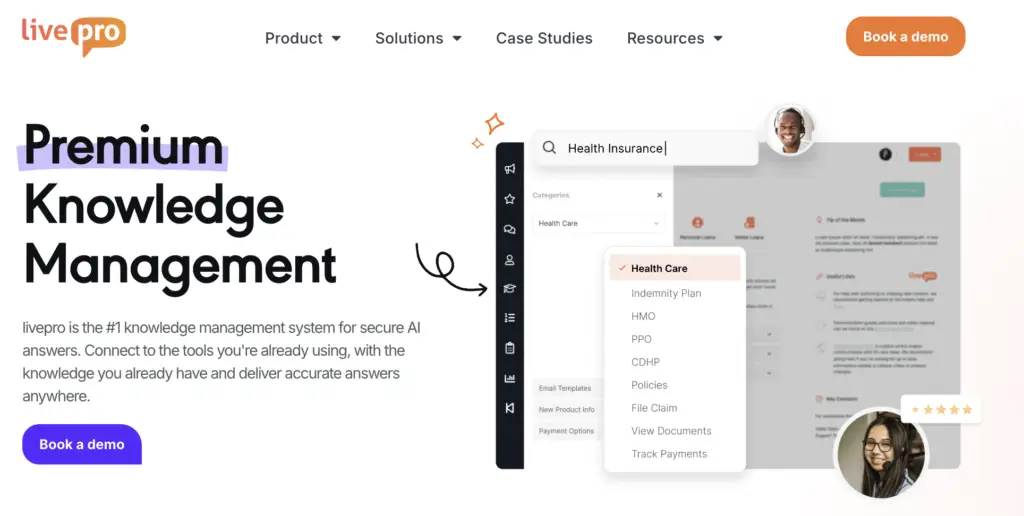
Learning how to improve call center agent performance starts with giving them quick access to the information they need.
livepro is an AI-powered knowledge management system that centralizes scattered data into a single, searchable source of truth. Every document, app, or PDF agents rely on gets consolidated into one platform.
When agents ask livepro a question, they get quick, summarized answers they can read straight to the customer, not an article they have to skim mid-call. For complex cases, decision trees walk agents through the process step by step until they land on the right resolution. And when call volume spikes past what your team can physically handle, livepro’s AI voice agent picks up the overflow, with real, conversational back-and-forth.
Here’s a full breakdown of how livepro can help your agents access knowledge faster and improve their performance.
AI-Powered Search to Reduce Agent Search Time
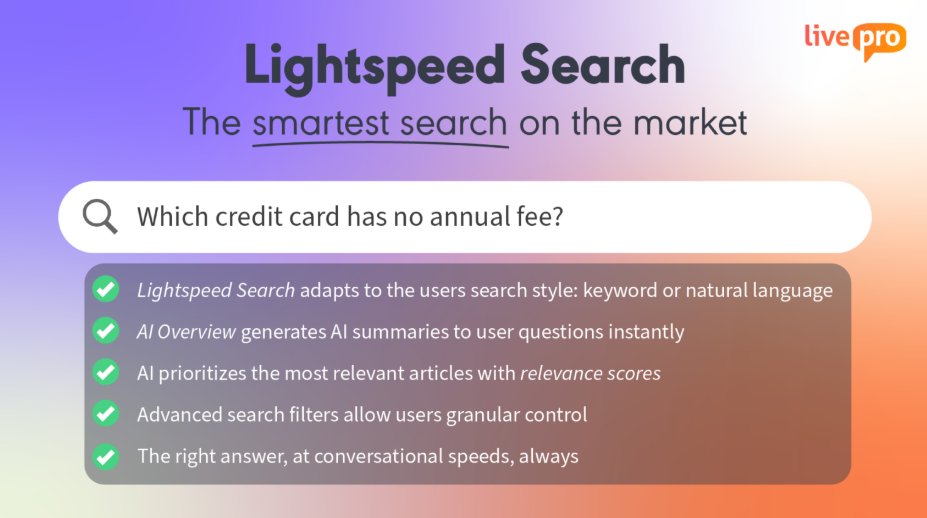
Call agents spend over 10% of every call time searching for answers across platforms like Slack, Teams, and the CRM. livepro cuts that search time down through AI-powered search.
Now your agents can find answers by typing a few keywords into the knowledge base and getting a quick, summarized response. livepro’s AI also uses natural language processing and vector search, so agents find the right answer whether they type an exact phrase or just a rough keyword.
It understands the intent behind a misspelling, an unfamiliar term, or an awkward phrase, and retrieves the right answer anyway. This helps agents spend more time with the customer and less time hunting for what to say.
Decision Trees for Guided Workflows
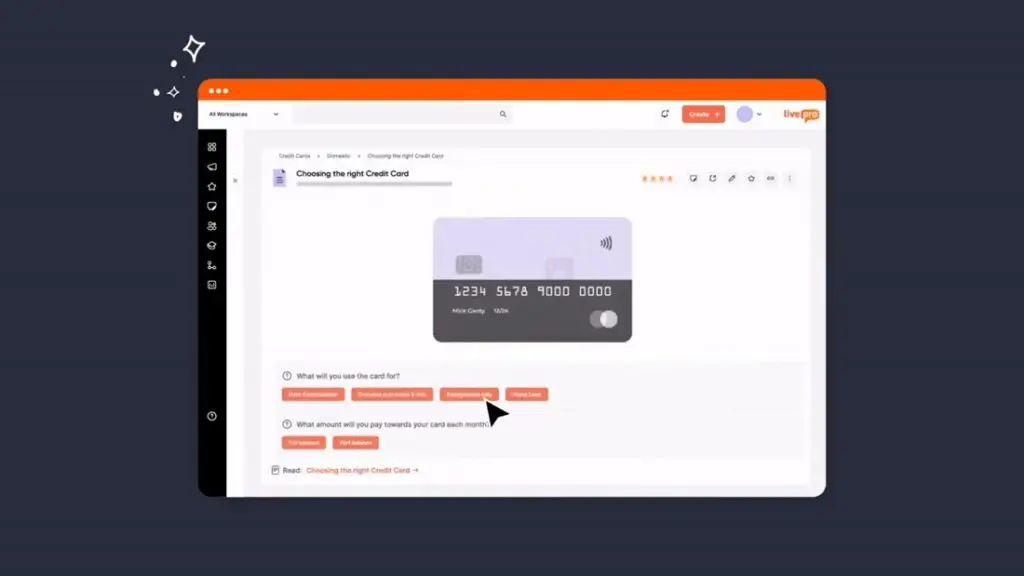
To handle a complex query, agents either work from memory or put customers on hold while reading a lengthy document. Both risk a wrong answer, longer hold times, or a compliance investigation.
livepro’s decision trees, called Rockets, guide agents through these processes step by step. It asks one question at a time, and the customer’s answer determines the next question, branching naturally to the right step in the workflow.
Take a bank handling a disputed charge: there are legal steps it must follow, and getting them wrong risks regulatory exposure. Without a decision tree, an agent has to remember what documentation the customer needs and under what conditions the dispute counts as authorized or unauthorized. With livepro’s decision tree, the agent works through it one question at a time until reaching a resolution.
The tree might ask: “Did the customer authorize this transaction in any way?” If yes, it branches to the merchant dispute path. Eventually it reaches a resolution of either filing a dispute or issuing provisional credit. This is designed to cut both errors and compliance risk.
Version Control and Automated Review Cycles
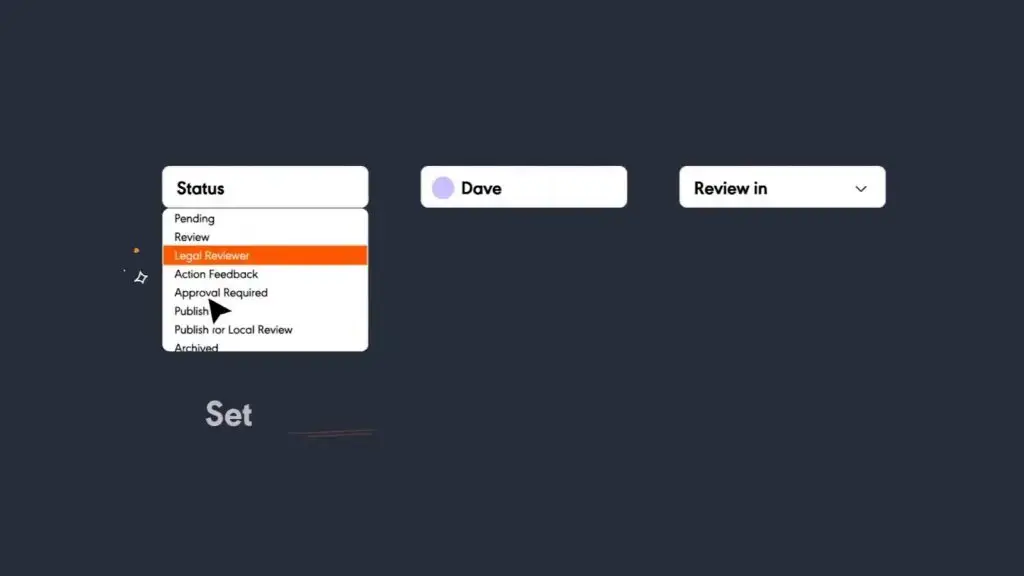
When multiple copies of a document exist, agents can’t tell which is current. Several copies might sit side by side in the same knowledge base, and agents use whichever one they find first. One agent answers from the updated version. Another pulls up something two months old, and different customers get conflicting answers from the same contact center.
livepro fixes this with version control and automated review cycles. Each article gets an owner responsible for reviewing or updating it by a set date. If the deadline passes, livepro automatically archives the outdated version so it doesn’t remain visible.
Version control keeps one clear, current version of every policy live, with a full audit log of who changed what, when, and why. Agents only see the latest version, but old ones stay recoverable if ever required.
That combination means agents are never guessing which policy is right, and that shows up directly in performance.
AI Voice Agent to Deflect Call Volume

Your agents can only handle so many calls at once. When volume outpaces capacity, performance drops no matter how skilled the team is. During peak periods like holiday sales or a major discount, call centers can receive more calls than the team can handle.
Luna, livepro’s AI voice agent, is built for this. It connects to your center’s knowledge base and responds to live callers like a real human. During peak volume, or outside office hours, Luna can handle several thousand calls at once and walk customers through their issue until they reach a resolution.
If a call is too complex, Luna routes it to a human agent with full context attached, so your team steps in only where they’re actually needed. It also supports multiple languages.
Customer Self-Service Solutions
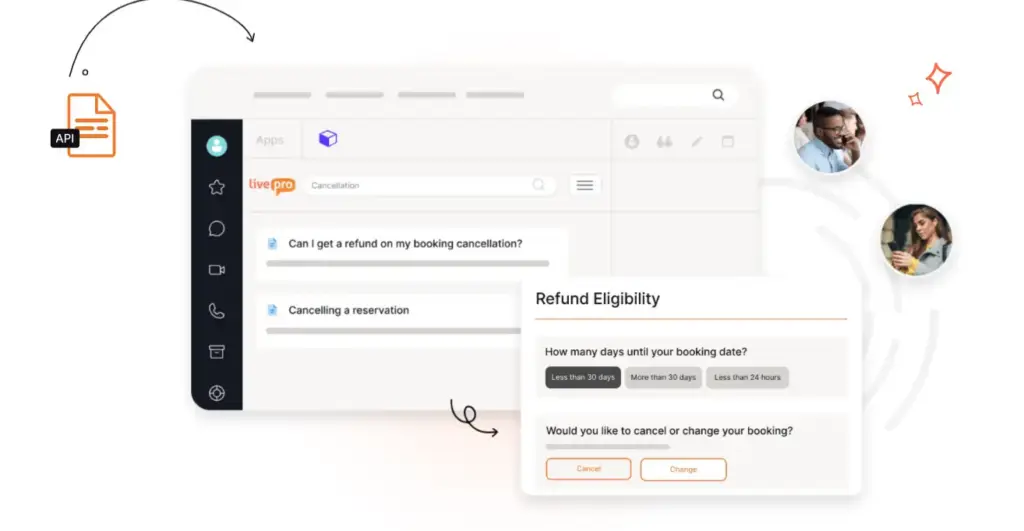
Repeat calls like “what’s my account balance” or “how do I reset my password” pile up and hog the queue, keeping agents too busy to handle the complex calls that need them. This means longer hold times and lower CSAT.
A self-service portal takes those questions off your agents’ plates entirely. Set one up with livepro, and it syncs directly with your center’s main knowledge base, so articles update automatically, while internal-only documentation stays hidden.
Customers can troubleshoot simple issues themselves, 24/7, without raising a ticket. This frees agents to focus on the queries that actually need human judgment.
Knowledge Analytics to Monitor Content Gaps and Agent Performance
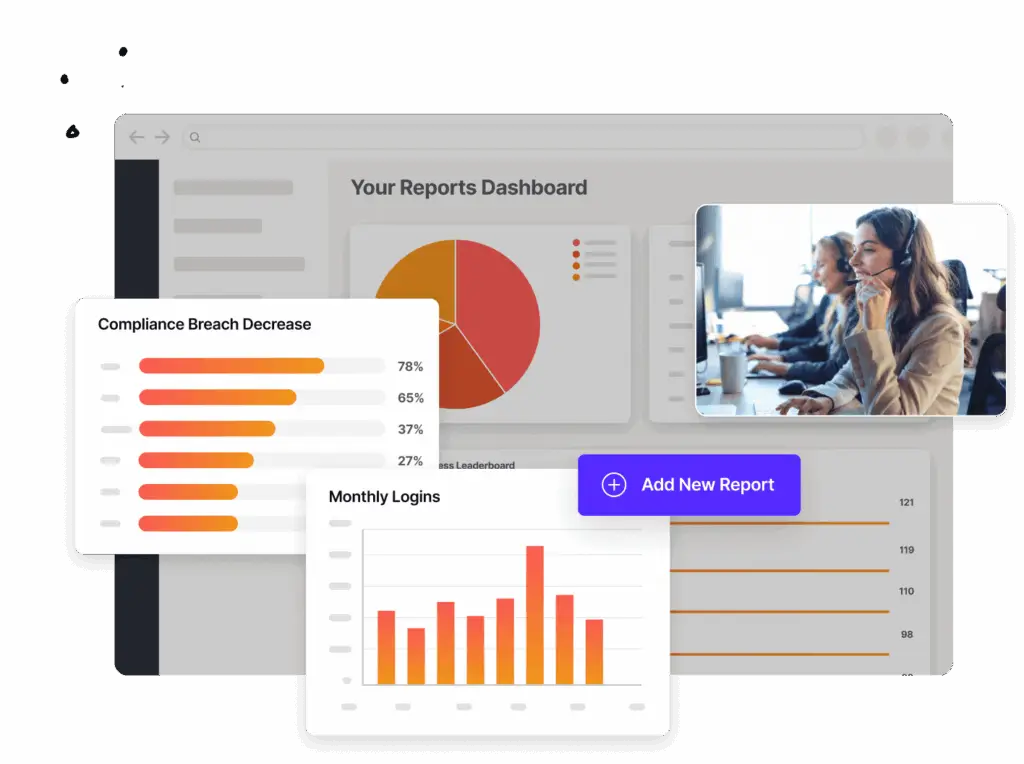
Keeping your knowledge base organized is only part of the story. You also need to track how it’s used, which articles get pulled often, which searches return nothing, and which articles agents have quietly abandoned.
livepro’s dashboard tracks all of this:
- Usage tracking: See which teams or agents have stopped using the knowledge base, so you can learn why.
- Content performance: Shows which articles are useful and which aren’t.
- Failed searches: Frequent searches that return no results signal a gap, an article that needs to exist but doesn’t.
- Trending searches: What agents and customers search for most, and why.
With this data, knowledge specialists see exactly where agents struggle to find answers, and close the gap by creating the articles that fill it.
Integrations to Keep Agents in the Same Workflow
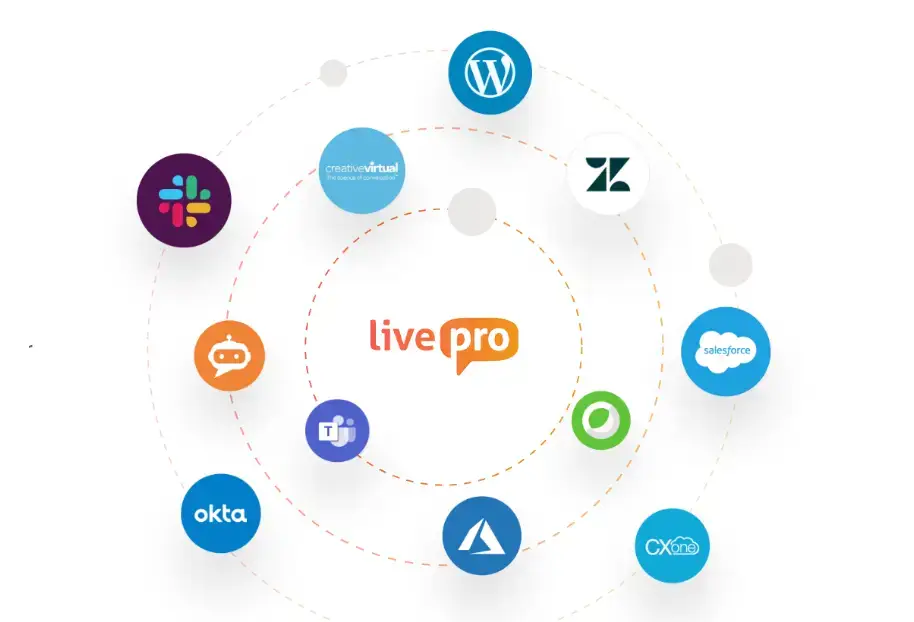
Scattered knowledge is one reason agents spend minutes searching mid-call. Some information lives on Slack, some in email, some in Salesforce, with no clear connection between any of them. livepro’s integrations consolidate these tools, so agents can search across all of them without switching between platforms.
livepro connects directly to the tools agents already use:
- Salesforce: Surfaces the right article right inside the case or account an agent’s already looking at.
- Zendesk: Sits next to the ticket, matched to the issue type, so agents don’t have to switch windows to find an answer.
- Microsoft Teams: Lets agents search livepro and share articles with teammates without leaving Teams.
- Genesys Cloud and NICE CXone: Push the right knowledge article straight to the agent’s screen before the agent even has to search.
This keeps agents in one workflow and cuts the time they’d otherwise spend digging across five tools for one answer.
Case Study: How livepro Helped a Finance Call Center Reduce Agent Search Time
Atlanticus is a financial services company based in Atlanta, Georgia, founded in 1996. They serve everyday Americans who need financial support but don’t meet the credit standards traditional lenders require.
Their call center handles customer queries and guides them through key processes. But their existing knowledge base was slow and hard to use. Agents relied on official documentation less than 5% of the time, and this drove up handle times and opened real compliance gaps.
Atlanticus turned to livepro to fix these failing metrics, improve customer service and agent performance.
Problem
Atlanticus’s previous knowledge base was disorganized and outdated, which meant agents didn’t have the guidance they needed on policies and documentation.
That gap showed up in a few ways:
- Agents followed official documentation less than 5% of the time. They relied on unofficial workarounds instead.
- Updates and announcements went out as PDFs or emails. This caused miscommunication and left team leads and agents misaligned on which version was current.
- Handle times stayed high. Compliance, customer satisfaction, and agent efficiency all suffered.
Solution
Atlanticus recognized that their agents’ poor performance came from having no centralized platform for fast, accurate answers during live calls.
They switched to livepro to:
- Centralize data, so agents find official answers quickly and pass them on to customers.
- Reduce handle times.
- Enhance compliance.
- Fix announcements to track who’s seen each update, so the whole team stays on the same page.
Results
livepro turned out to be exactly what Atlanticus needed. Agents adopted it quickly, since it was easy to use, and started using official documentation again now that it was searchable.
AI-powered search helped them find answers faster, and decision trees walked them through complex, high-error questions they used to need extra guidance for. Agents performed better across the board. They became faster and more confident on calls that used to slow them down.
Here are the actual numbers:
- 14% reduction in average handle time, from 266 seconds to 230 seconds, as agents found answers faster and resolved issues quicker
- 100% agent adoption across the target centers
- Over 2,000 pieces of unique agent feedback on how useful livepro was
- 100% compliance, since agents no longer relied on unofficial workarounds.
Book a demo to see how livepro helps your agents find the right answer, so you can cut handle time and deliver consistent service across every call.
FAQs
How to improve call center customer satisfaction?
Give agents the information they need to answer accurately on the first try. CSAT drops when customers have to call back, wait on hold, or get inconsistent answers. These are all symptoms of a knowledge access problem. Fix how fast and how accurately agents find answers, and CSAT follows.
How to increase agent productivity in a call center?
Look at how agents actually spend their shift. A lot of time is lost during post-call wrap-up that drags because documentation is manual, or while agents wait for the next call because forecasting was off. Shrink those gaps and agent productivity will go up without touching call quality at all.
How to measure call center agent performance?
Track AHT, FCR, and CSAT together. A low AHT paired with a low FCR just means agents are rushing customers off the phone without solving anything. Look at QA scores too, but don’t rely on them alone. They only capture a small sample of calls and miss patterns agents won’t admit to under threat of a write-up. The clearest signal is if customers get the right answer on the first call, without having to call back.
How to reduce average handle time in a call center?
Break down where handle time goes. Every call splits into talk time, hold time, and after-call work. If hold time is the biggest chunk, agents are stopping mid-call to search for something. If after-call work is high, they’re stuck doing documentation the system should handle on its own.
What is the 80/20 rule in a call center?
It’s a service level target of answering 80% of incoming calls within 20 seconds. It’s a staffing and responsiveness benchmark, not a measure of call quality. A center can hit 80/20 and still deliver wrong answers or long, frustrating calls once someone’s connected. Many contact centers adjust the numbers based on industry. Healthcare and financial services often aim for a stricter target, like 90% of calls answered within 15 seconds.