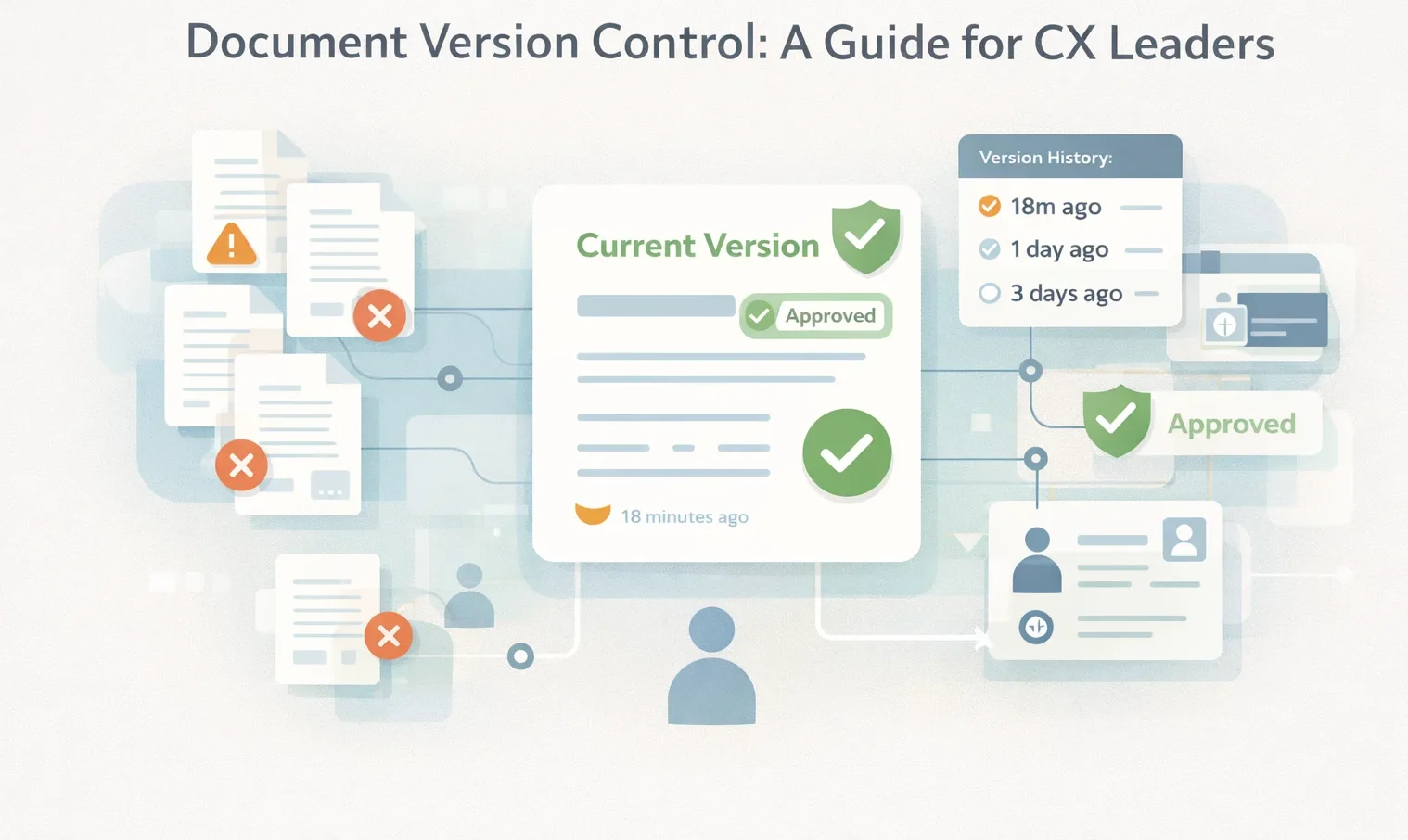


Document version control prevents customer-facing teams from giving conflicting answers. Without it, agents work from different versions of the same policy, which creates inconsistent service and compliance risk.
The breakdown happens when updates aren’t centralized. A refund policy update exists in three places—a PDF in a shared drive, an emailed doc, and an outdated wiki page. One agent denies a refund using the old policy. Another approves it using a different version. The customer calls back frustrated, creating repeat contacts and longer handle times.
Agents describe the problem this way:
- “Which one is the latest? I’ve got three ‘final’ versions.”
- “The article says one thing, the PDF says another. What do I tell them?”
- “I can’t find the answer fast enough while the customer’s on the line.”
- “I don’t trust what I’m seeing, so I have to ask a supervisor.”
This article explains what document version control is, why it fails in CX teams, and how to build a system that keeps knowledge accurate and easy to use.
What Is Document Version Control and How Does It Work?
Document version control is the process of managing documents as they change over time. It makes sure your team uses the latest version and sees what changed, who changed it, and when.
Basic file storage can keep documents in one place and show “version history,” but it doesn’t stop confusion when there are multiple copies across folders, links, and email attachments. Version control adds a clear current version, a record of changes, and (in many systems) rules for who can edit, review, and publish.
Here are the technical mechanics of version tracking:
- Change detection: Records what changed between versions.
- Incremental storage: Saves changes over time instead of duplicating the whole file each update.
- Audit trails: Logs what changed, who made the change, and when it was made.
When multiple people update content, version control helps avoid conflicts. Some systems allow only one person to edit at a time. Others allow numerous edits and flag conflicts when changes overlap. This reduces the risk of two people using two different versions and giving different answers to customers.
In customer facing environments, teams need to see the current version and access older versions when required. Fast rollback matters when the wrong information is published, a policy change needs to be made quickly, or a mistake needs to be fixed promptly.
When multiple people edit content (operations, compliance, training), version control helps prevent conflicts and duplicate versions. Without controls, different versions get shared, agents follow different steps, and customers get different answers.
Why Document Version Control Is Critical for Customer-Facing Teams
Customer-facing teams are any roles that use internal documents to give answers to customers in real time. That includes contact center agents (voice/chat/email), patient access and scheduling teams in healthcare, front-desk and billing support, and outsourced teams like BPOs/VMOs that handle service on behalf of a brand.
Document version control is critical for these teams because they don’t just store information; they act on it live.
When the “current” version isn’t clear, the result isn’t a messy folder structure. It’s inconsistent answers, avoidable escalations, and compliance risk.
Here’s why it matters by industry:
Healthcare (Patient Access, Scheduling, Billing, Care Navigation)
In highly regulated industries like healthcare, experience is strongly shaped by communication and access to information across the system. The Agency for Healthcare Research and Quality (AHRQ) describes patient experience as the range of interactions patients have with the healthcare system, including good communication, easy access to information, and the ability to schedule timely appointments.
When document versions aren’t controlled, common failure points include:
- Outdated scheduling rules (referrals, eligibility steps, required documents)
- Incorrect billing guidance (coverage, payment options, dispute steps
- Mismatched discharge or medication communication across teams.
Version control reduces these issues by ensuring teams use the most current and approved guidance, especially during frequent policy changes.
Contact Center Teams
In a contact center, version control is what prevents “two agents, two answers.” The International Organization for Standardization (ISO) contact center standard emphasizes consistent handling across customer channels. It also requires that the information provided to customers is accurate, relevant, and easy to understand.
Without version control, your agents:
- Spend longer searching or second-guessing
- Escalate issues that they could have resolved
- Fail quality checks because they used an older script/process.
Financial Services Teams (Banking, Lending, Fraud, And Disputes)
In banking and other financial services, minor information errors create outsized risk. They handle regulated interactions such as identity checks, complaints, disputes, loan servicing, and fraud support, where the correct answer depends on the latest policy, product terms, or regulatory requirement.
When version control is weak, common issues include:
- Inconsistent fee, refund, or dispute guidance across channels
- Outdated scripts for verification and security steps
- Incorrect escalation paths for fraud or vulnerable customers
- Compliance exposure occurs when teams use older forms or outdated wording.
Strong version control helps ensure the active version is always current and approved. It supports traceability when a complaint, audit, or investigation requires proof of what guidance was in place at a specific time.
Outsourced Teams
Outsourced teams add complexity: more locations, more contributors, and more frequent updates across client programs.
ISO’s client-side standard for contact centers (ISO 18295-2) is designed to help ensure customer expectations are consistently met when services are delivered through in-house or outsourced customer contact centers across channels.
Version control helps prevent policy drift across sites, where one team updates guidance, and another keeps using an older version, leading to inconsistent customer outcomes.
Common Document Version Control Challenges Customer-Facing Teams Face
Below are the most common version-control breakdowns observed in call centers, healthcare teams, financial services support, and outsourced CX operations.
Limited Access
Customer-facing teams increasingly operate across multiple sites, shifts, and remote environments. Version control breaks down when systems are not accessible wherever agents work.
Common issues include:
- Content is only accessible on specific devices or networks
- Slow or unreliable access during live interactions
- Lack of integration with the tools agents use every day.
When agents can’t reliably access the latest information during a live conversation, they either delay the customer, rely on memory, or escalate unnecessarily.
Reliance on Legacy Tools Not Built for Frontline Use
Many organizations still rely on older tools designed for document storage, not live customer interactions. These tools often:
- Require manual updates and file sharing
- Make it hard to confirm which version is current
- Lacks real-time visibility into changes
- Don’t scale well as content and teams grow.
This creates version sprawl, multiple files, links, and attachments with no clear “source of truth.”
Lack of Adoption of a Knowledge Management System
Even when version tracking exists somewhere, it fails because frontline teams don’t actually use it. This usually happens when:
- Knowledge systems are complex to search or slow to use
- Content is written for back-office reference, not live conversations
- Agents are trained to “ask a colleague” instead of trusting the system
- Updates are communicated informally rather than embedded in workflows.
Without the strong implementation of a knowledge management system, version control exists only in theory, not in daily operations. Documents become outdated, workarounds emerge, and inconsistent answers follow.
No Clear Ownership or Governance for Customer-Facing Content
Version control requires more than technology. Many CX teams lack clear rules around who owns content and how changes are managed. Common gaps include:
- No formal review or approval process
- Irregular or missed review cycles
- Outdated content stays live because no one is accountable.
Without governance, even small changes, policy updates, fee changes, and eligibility rules can create confusion and risk across teams.
Collaboration Without Controls
Customer knowledge is often updated by multiple teams: operations, compliance, product, training, and vendors. Without controls, collaboration becomes a risk. Common problems include:
- Overlapping edits
- Conflicting guidance was published at the same time
- Different teams are following different versions of the same process.
For customer-facing teams, this shows up as inconsistent answers, failed quality checks, and customer frustration.
How livepro Enables Document Version Control for Customer-Facing Teams
livepro is an AI-based knowledge management system designed for customer-facing teams that rely on accurate, up-to-date information during live interactions.
Instead of managing static documents or disconnected files, livepro provides an end-to-end knowledge workflow where version control is built into how content is authored, reviewed, approved, and used.
This approach helps agents in contact centers, healthcare access teams, financial services support, and outsourced operations work from the latest approved version.
Let’s discuss livepro’s key features in detail:
WYSIWYG Authoring and Drag-and-Drop Guidance to Reduce Version Sprawl
Customer-facing content changes frequently. Policies get updated, scripts evolve, and procedures are refined. When updates rely on file uploads or external tools, teams create multiple copies of the same document, leading to confusion.
livepro’s WYSIWYG editor and drag-and-drop guidance authoring allow subject matter experts to update content directly within the system. Changes are applied to a single source of truth, rather than generating new documents.
This helps teams:
- Update policies and procedures without creating duplicate files
- Maintain consistent structure and formatting across articles
- Reduce version errors caused by copying, pasting, or reformatting
For example, when a refund policy changes, the update is made once in livepro and instantly reflected for all agents, without sending emails or replacing PDFs.
Built-In Version Control and Visual Version Comparison
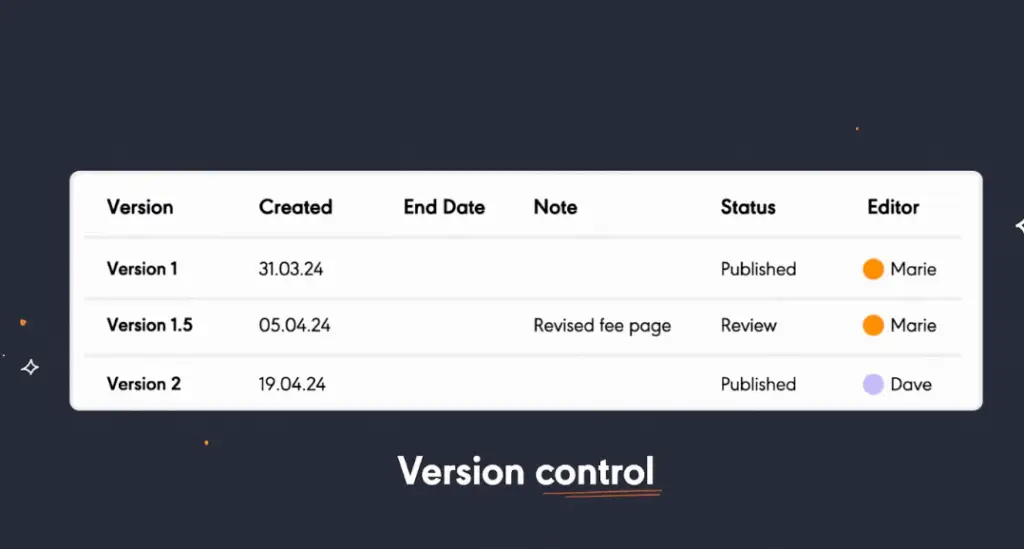
Every change made in livepro automatically creates a new version of the content. This version history captures who made the update, when it was made, and what changed, giving teams a clear audit trail.
livepro’s visual version comparison allows authors and reviewers to see changes side by side before publishing. This is especially important for BPOs and contact centers, where small wording changes can impact compliance.
Teams can:
- Identify additions, removals, and edits instantly
- Confirm updates before they go live
- Reduce review time during policy or process changes.
For example, when eligibility wording is updated, reviewers can quickly confirm that only the intended section changed, without rereading the entire article.
Role-Based Permissions to Control Who Can Change Customer-Facing Content
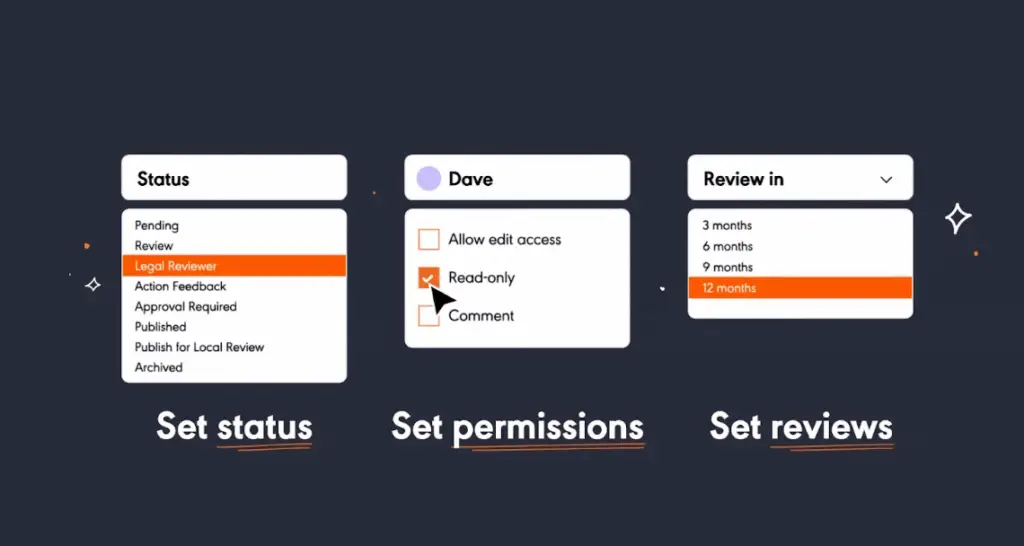
Not all users should be able to edit or publish content that agents rely on in live conversations. livepro uses role-based permissions to control access based on role, team, or responsibility.
Organizations can define who can:
- Author or edit content
- Review and approve updates
- Publish content to frontline teams
This prevents unauthorized or premature changes and ensures accountability across the content lifecycle.
For example, an agent may be able to view and give feedback on an article, while only compliance or operations teams can approve and publish changes.
Structured Review and Approval Workflows to Prevent Unapproved Content from Going Live
Customer-facing teams struggle with “draft” or partially reviewed guidance slipping into use.
livepro’s authored content review workflows ensure updates follow a defined approval path before becoming visible to agents. This helps organizations:
- Validate content with the right subject matter experts
- Meet compliance and policy requirements
- Prevent incomplete or incorrect guidance from being used
For example, a billing update may require review by compliance and operations before it becomes available to frontline teams.
Scheduled Publication and Automated Review Reminders to Keep Content Current
Outdated content is one of the biggest causes of inconsistent answers. livepro supports document lifecycle management through:
- Scheduled publication, so updates go live exactly when a policy takes effect
- Automated review date reminders, prompting owners to review content at set intervals
This prevents outdated guidance from remaining active simply because no one remembered to update it.
For example, when a temporary policy expires, livepro can automatically prompt a review or retire the content to avoid agents referencing old rules.
Feedback Management Flow to Improve Content Based on Frontline Use
livepro’s feedback management flow allows agents to submit feedback directly on the content they’re using. Feedback is tracked, routed to the right owners, and resolved through controlled updates rather than informal messages.
This enables:
- Faster identification of content issues
- Structured review and resolution
- Continuous improvement of customer-facing knowledge
For example, if agents flag that a process step no longer matches reality, the update can be reviewed, versioned, and published without breaking governance.
Best Practices for Effective Document Version Control
For customer-facing teams, document version control must work in live environments, while customers wait, policies change, and multiple teams contribute to content. The best practices below focus on operational use, not back-office documentation:
Centralize Customer-Facing Knowledge in a Knowledge Management System
Effective document version control starts with centralizing information. This includes guidance, policies, procedures, scripts, and workflows inside a knowledge management system.
When content lives across shared drives, inboxes, and static files, agents are forced to decide which version is correct. A knowledge management system removes the need for decision-making by presenting a single current version while maintaining version history.
For example, when a refund policy is updated, instead of emailing a new PDF or renaming a file to “final_v3,” the revised guidance is published in the knowledge system. All agents see the latest version immediately, without downloading or searching for links.
Track Versions Automatically
Customer-facing teams don’t need to manage version numbers manually, but leaders do need visibility into changes. Effective version control includes:
- Automatic version history
- Clear records of what changed and when
- The ability to reference or restore previous versions.
This supports quality assurance, complaint handling, and audits without adding extra steps for agents.
Here’s a simple version tracking example:
| Version | Date Updated | Updated By | Summary of Change |
| v2.1 | July 16, 2024 | Policy Team | Updated refund eligibility wording |
| v2.0 | June 10, 2024 | Compliance | Added a new verification step |
Agents see the current guidance. Managers see the history when needed. With livepro, version tracking happens automatically as content is updated, without requiring manual logs or file duplication.
Establish Consistent Naming Conventions
File naming conventions help in file-based environments, but customer-facing teams shouldn’t have to interpret document names to determine accuracy.
Instead of relying on names like Refund_Policy_FINAL_v2_2024-07-15.docx, the best practice is to:
- Surface only the approved, current version in the knowledge system
- Hide outdated versions from the frontline view
- Use structure and governance, not filenames, to control accuracy.
This reduces hesitation and speeds up live interactions.
Review and Retire Content on a Defined Schedule
Outdated content is one of the biggest causes of inconsistent answers. Best practice includes:
- Assigning ownership to every article
- Setting regular review intervals (e.g., quarterly, annually, or policy-driven)
- Archiving or retiring content that is no longer valid.
For example, a dispute process changes due to regulation. The updated process has been published, and the previous version has been automatically archived so agents can’t accidentally reference it.
This prevents “we’re still telling customers the old steps” situations. livepro supports this best practice through scheduled reviews and automated reminders that prompt owners to validate content before it becomes outdated.
Enable Collaboration Without Creating Conflicting Versions
Knowledge is updated by multiple groups, including operations, compliance, product, training, and sometimes external partners. Strong version control supports collaboration by:
- Defining who can edit, review, and publish
- Ensuring only one version is live at any time
- Preventing parallel “working copies” from becoming active guidance.
Design Version Control Around How Agents Actually Work
Version control only works if agents trust the system during live conversations. Best practices align version control with:
- Fast search and navigation
- Minimal clicks to confirm accuracy
- Confidence that “what I’m seeing is correct.”
When version control is embedded in a knowledge management workflow, agents stop asking “Is this the latest?” and start focusing on the customer.
Bottom Line: Better Document Version Control Starts With Better Knowledge Management
Document version control becomes difficult in customer-facing environments. Without a structured knowledge management approach, outdated content stays in use, compliance risk increases, and agents spend time checking whether information is current.
livepro supports document version control within knowledge workflows. It combines intuitive authoring, built-in version control, and visual version comparison with governance and approval workflows.
Together with scheduled reviews and feedback management, this helps teams keep knowledge accurate and up to date during live interactions.
Book a demo to see how livepro keeps your agents working from the latest approved content during every customer interaction.