

A customer calls and is put on hold for 20 minutes for a question on an insurance plan. When the call finally transfers, your agent searches through 30+ documents for the right answer, but half of them are outdated or give conflicting information. The agent then transfers the call to the supervisor, who’s already busy with multiple other calls.
Most teams solve this issue by training their agents on how to handle complex calls. They deploy more tools, create call scripts, or add extra steps to improve their service. None of it fixes the real problem: the knowledge agents rely on.
This article covers how to reduce calls in a call center. You’ll learn the mistakes call center teams make, and strategies you can adopt to fix the root causes behind the high call volume.
Why Call Volume Keeps Rising At Your Call Center (Even After You Add Headcount)
Most contact centers respond to rising call volume by hiring more. And then waits for queues to shrink. For a few weeks, they do.
Then volume climbs back, sometimes higher than before. New agents answer calls faster, but the calls keep coming for the same reasons: agents can’t find accurate answers, transfers lose context, and unresolved issues turn into callbacks. Hiring treats the symptom, not the cause.”
This high call volume leads to costly wait times. Customers stuck in the queue abandon calls that turn into repeat calls once frustration builds. According to ContactBabel’s 2025 report, a service call now runs over seven minutes. But if your knowledge is scattered across shared drives, outdated PDFs, and tribal memory, the wait time grows longer.
Long queues also push supervisors to rush calls, which lowers resolution quality and creates the next round of repeat contacts. Repeat calls alone account for close to a quarter of a typical call center’s operating budget.
The Root-Cause Framework: Diagnosing What Drives Your Call Volume
Many teams jump straight to applying solutions without understanding where the problem lies. They add self-service, retrain agents, or roll out new tools, then wonder why call volume barely moves. The fix rarely matches the cause because nobody identified the cause first.
Four patterns account for most of the calls a knowledge problem can prevent.
Repeat Calls (Unresolved Issues)
A customer calls, an agent gives a vague answer, and the ticket closes. The issue is never resolved, so the customer calls back within a week. A rising callback rate alongside a falling first-contact resolution rate signals this pattern.
Avoidable Calls (Outdated or Missing Information)
The knowledge base is stale, split across PDFs and intranets, or missing entirely for the topic. Agents and customers end up working from different versions of the truth. Two agents give two different answers to the same question. Calls pile up on topics that should never have reached a live agent.
Misdirected Calls (Wrong Agent, Wrong Channel)
A caller lands in the wrong queue and gets transferred. They repeat their entire issue to a second agent with no record of the first call. High transfer rates and agents flagging misrouted calls are the tell.
Policy Confusion Calls (Unclear or Inconsistent Answers)
A policy changes, but the update doesn’t reach every agent at the same time. One team works from the new policy, another still reads from the old one. Customers get contradictory answers to the same question within days. Compliance escalations and call spikes after a policy change are the clearest signal.
Call Suppression Tactics Call Center Teams Use That Backfire
Under pressure to cut call volume fast, some teams reach for suppression. Here’s why some tactics lead to greater problems like customer dissatisfaction, cancellations, and higher volume of queries:
Hiding the Phone Number
Some companies bury the contact number deep in the website or remove it from the app entirely, betting that customers will give up and use self-service. The decision often comes from outside the contact center, driven by cost-per-contact targets.
Some customers do give up. Others search harder, grow frustrated, and call anyway, now carrying extra irritation into the conversation. The call still happens. It just starts with a worse customer experience and a longer handle time.
Removing Contact Channels to Push Digital Adoption
Teams cut email support or live chat to force customers toward a self-service portal, assuming fewer channels means fewer contacts. Customers who can’t find their answer call. And the calls that remain skew toward the hardest issues, since the easy ones never had a real self-service path to begin with.
Rushing Agents to Hit AHT Targets
Teams set an average handle time (AHT) target and coach agents to end calls faster, regardless of whether the issue actually is resolved. Handle time drops on paper. The resolution rate drops with it, and the customer calls back for the same issue within days. The metric improves while the underlying problem multiplies.
Forcing Customers Into Chatbot Loops
Chatbots pick up the call, answer the basic questions, then loop the customer back to the same menu when the issue gets complicated. There’s no clear path to a human agent, so the customer keeps retrying the bot before giving up and calling in anyway.
By the time they reach an agent, they are already annoyed, and the agent starts from zero because the bot kept no record worth passing along.
Why AI Call Agents Alone Can’t Solve the Problem
A Gartner survey shows that 91% of customer service and support leaders are under executive pressure to implement AI in 2026. Most of that investment goes toward the agent answering the phone.
Most AI agents handle simple FAQs and triage, but complex issues, exceptions, and anything requiring judgment still land on a live agent’s queue. The AI agent shortens the wait, but not the work itself.
That work gets harder in one specific way. The customer already explained their issue once, to the AI. When the human agent asks them to explain it again because no context was passed through, the customer arrives already frustrated.
The deeper issue sits underneath the AI agent itself. It answers using whatever knowledge it can access, and if that knowledge is the same scattered PDFs and outdated intranet pages human agents already struggle with, the AI delivers bad answers faster. The same Gartner survey found 58% of service leaders are now prioritizing upskilling agents into knowledge management specialists. AI and self-service both depend on accurate, current content underneath them.
How to Reduce Calls in a Call Center: 7 Proven Strategies You Can Apply
A customer experience strategy falls apart when agents can’t find answers, knowledge lives in scattered systems, and calls get routed to the wrong person. Each strategy below shows you how to reduce calls in a call center. It maps to one of the root causes from the framework, so you can apply the right fix:
Focus on First-Contact Resolution
Give agents guided troubleshooting that walks them through a verification step before they close the call. A quick confirmation question, “Does this fully resolve your issue?” catches the gap before the customer hangs up unsure.
SQM Group’s benchmarking puts a good first-contact resolution rate between 70% and 79%. Only about 5% of contact centers reach the world-class tier of 80% or higher.
Improve Knowledge Delivery
Replace scattered PDFs and outdated intranet pages with a single governed knowledge base that agents and customers can both trust. Set a review cycle so articles get checked on a schedule instead of going stale unnoticed.
When the answer only exists in one accurate place, agents stop guessing. And customers stop calling for information that should have been easy to find.
Adopt Customer Self-Service Solutions
Build self-service around the same accurate content agents use, not a stripped-down version of it. A searchable FAQ or portal only reduces calls if customers can find and trust the answer inside it.
Deflection done well removes the easy calls. If you don’t address this issue, it just adds a frustrating extra step before the customer calls.
Guide New Agent Onboarding
Create a structured onboarding path built around a centralized knowledge base that agents use. New hires can practice pulling real answers instead of memorizing scripts that go stale.
Add ongoing coaching after the initial ramp period. Structured check-ins at 30, 60, and 90 days help new agents keep building themselves.
Implement Smarter Routing With Context
Route calls using skill match and customer history, so the first agent who picks up is the right one. When a transfer does happen, pass the context along with it so the customer doesn’t repeat their issue from scratch.
Fewer wrong-queue calls means fewer transfers, and fewer transfers means shorter calls overall.
Govern Policy Changes Before They Reach Agents
Assign one person or team to own policy changes, so updates go through a review step before they reach the floor instead of getting forwarded straight from legal or compliance.
This matters most in regulated teams, where an outdated answer is a compliance risk. Keeping a record of what changed and when also helps teams trace back which agents were working from an old version if a compliance issue surfaces later.
Track Call Volume Metrics
Here are some metrics you can track to see your call volume:
- Average handle time (AHT): Tracks talk time, hold time, and after-call work. A drop in AHT only signals real progress when the underlying issue is resolved.
- First-contact resolution (FCR): Measures whether the issue got solved on the first call. A good FCR rate falls between 70% and 79%, with 80% or higher considered world-class.
- Repeat call rate: Tracks how many customers call back about the same issue within seven days.
- Self-service deflection rate: Measures how many customer questions get resolved online or through an AI agent without ever reaching a live agent.
- Call abandonment rate: Tracks the percentage of customers who hang up before an agent answers, often a sign of long queue times.
- Call transfer rate: Tracks how often a call gets passed to another agent, usually a sign of routing issues or knowledge gaps.
- CSAT (Customer Satisfaction Score): Measures how customers rate their experience after a call, usually through a post-call survey.
- Onboarding time: Tracks how long a new agent takes to reach full competency.
- Compliance and script adherence: Monitors whether agents followed required disclosures, verification steps, and approved language on the call.
For regulated teams, compliance adherence deserves the same weight as AHT and FCR. A call center can hit every volume and speed target and still fail an audit if agents skipped a required disclosure or worked from an outdated script.
How livepro Helps Contact Centers Reduce Call Volume and Handle Time
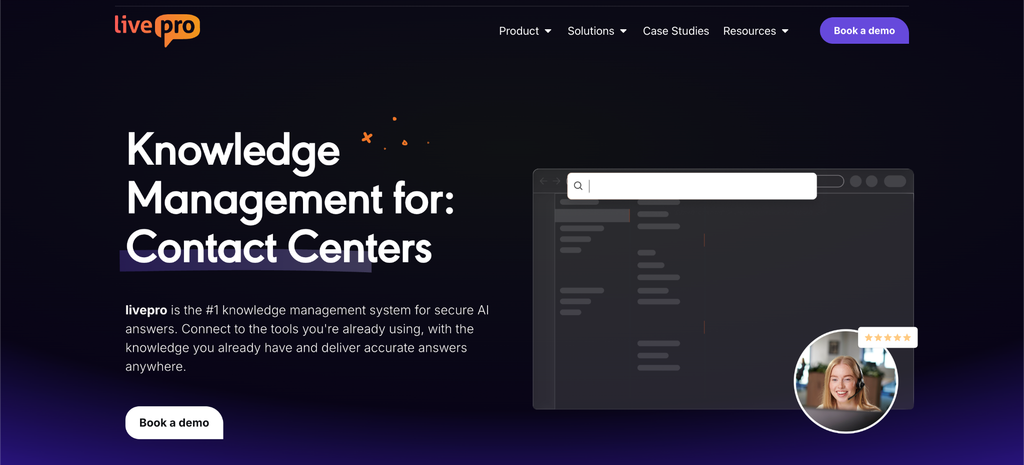
If you want your agents, internal teams, and customers to find accurate answers to their complex queries, you need a centralized system that gives you a single source of truth.
livepro is an AI-powered knowledge management system built for contact centers that want to move beyond call scripts and improve service quality. It serves highly-regulated industries like healthcare, BPOs, and local governments,
livepro offers decision trees for complex queries, intelligent search to deliver answers, and self-service portals for customers. It also supports Luna, an AI voice agent that handles calls 24/7. It retrieves answers from the same knowledge base your agents use, so you can reduce call volume for repetitive queries.
livepro ranks among the top 5 knowledge management systems on G2’s 2026 Spring report.
Here’s how livepro features help reduce calls in a call center:
Lightspeed Search to Give Agents Instant Answers Mid-Call
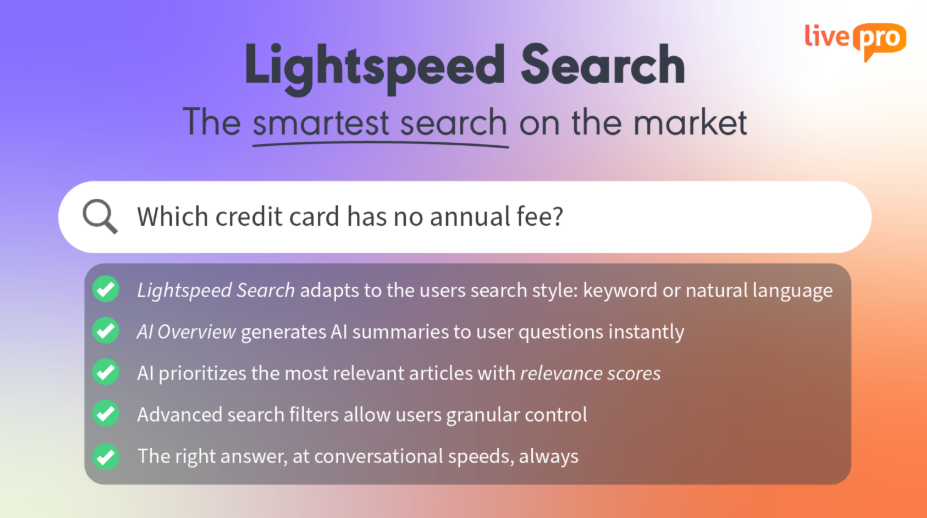
Agents lose time switching between systems to find the right answer, and every second on hold adds to handle time.
livepro’s Lightspeed Search combines natural language, semantic understanding, and keyword matching to retrieve and deliver answers in real-time. An agent can type a term, and the search understands the intent, not just the keyword, to surface accurate, verified answers. Even if an agent makes a typo or uses a different term, the search still returns the right information.
The search also ranks results by relevance and surfaces the most current version, so agents never work from an outdated article by accident. The search sits inside the same screen agents already use during a call, so there’s no toggling between tabs or systems mid-conversation.
This gives agents the confidence to deliver quality customer service and handle calls faster. For example, TSA Group cut its knowledge search time by 58% after implementing livepro. This brought average handle time down by 21% in the process.
Decision Trees to Guide Agents Through Complex Processes Step by Step
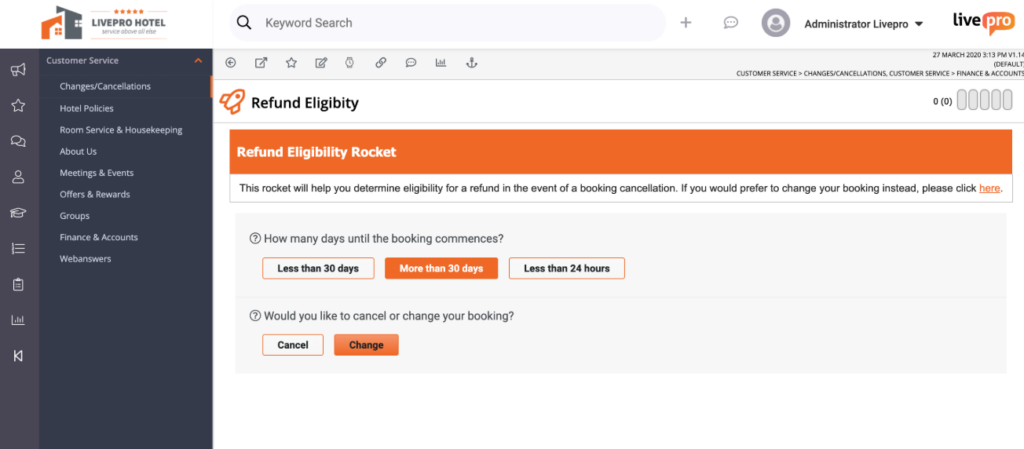
Multi-step processes are where new agents stumble, and experienced agents second-guess themselves. These processes often branch based on customer-specific details, like account type, region, or product version.
Many agents either provide wrong information or transfer calls to experienced agents. The call queue increases because the transferred call adds to another agent’s workload.
livepro’s decision trees walk agents through each step of a process in order. It breaks complex processes into step-by-step guidance, so every agent follows the right path, regardless of their experience.
It asks one targeted question at a time, and each answer triggers the next relevant step. The flow narrows down until it reaches the approved outcome. During a billing investigation, for example, the decision tree walks the agent through account status, eligibility, and exception questions in sequence, so the resolution the agent lands on is always the one policy supports.
Knowledge managers can build decision trees using the drag-and-drop editor. They select a template, then add each question and outcome as a step, arranging the branches visually. Each branch connects to the next question or the final approved outcome, so the whole flow takes shape as a visual map.
Customer Self-Service Solutions to Deliver Answers Across Every Channel
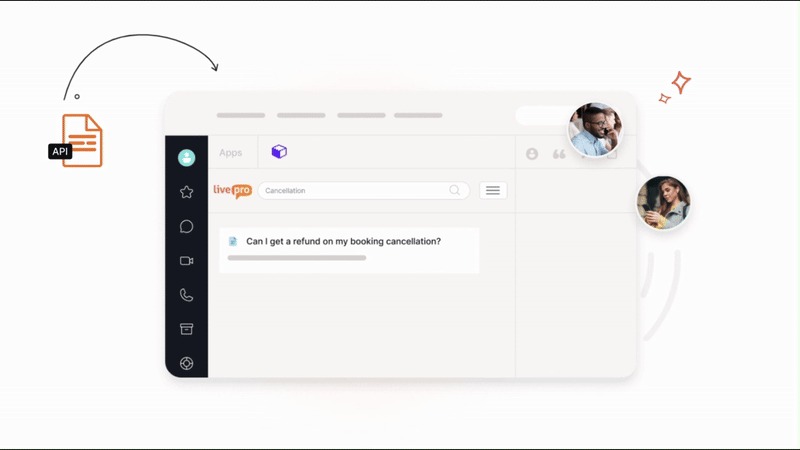
Most customers call because they can’t find answers on the website.
livepro offers customer self-service solutions that connect to the same knowledge base your agents and internal teams use. The platform supports:
- WebAnswers: Connects your website or app to your knowledge base through a simple API, syncing content in real time so nothing goes out of date.
- Open API: Delivers the same knowledge base to any channel, existing website, human-assisted chat, chatbot, or voice IVR, from one single source of truth.
Customers resolve simple, common questions without ever entering the queue, which pulls that volume off agent time entirely. What’s left in the queue skews toward the harder issues, the ones that need a person. Agents spend their time on important calls instead of repeating answers a self-service page could have handled.
Luna Voice AI to Handle Basic Calls Without Handoffs
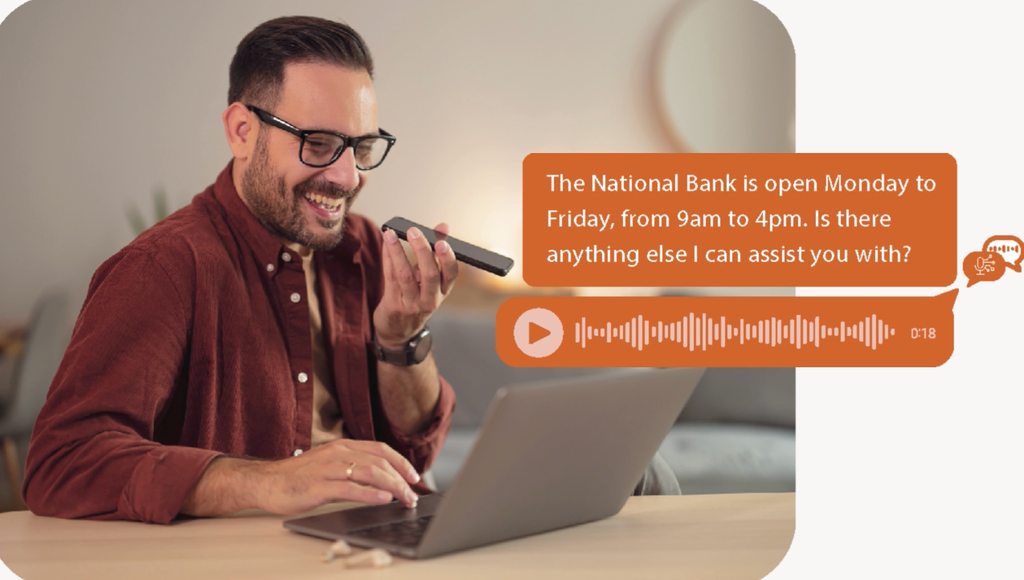
A large share of inbound volume follows the same handful of patterns. These calls rarely need a person, but they still take up a spot in the queue and compete with genuinely complex issues for the same agents.
livepro’s Luna is an AI voice agent available around the clock that answers these calls directly. It solves basic queries and books appointments without routing them to a human agent first.
Luna pulls answers from the same knowledge base agents use. When knowledge changes, Luna reflects the update immediately, so a customer calling minutes after a policy change still gets the current answer.
It also recognizes the language a customer is speaking and switches automatically, so multilingual callers get the same quality of answer. When an issue needs a person, Luna hands the conversation to an agent with complete context, so the customer doesn’t have to repeat themselves.
For example, a customer wants to know about coverage limits for an insurance plan. Luna answers all questions the customer asks directly from the approved knowledge base, so the response matches what an agent would give.
Announcements and Quizzes to Confirm Agents Know What Changed
A policy update sent by email or posted in Slack doesn’t guarantee anyone read it. Agents miss the message, forget it by their next shift, or skim past it while handling a live call, and the gap surfaces later as a wrong answer on the phone.
livepro’s Announcements display time-sensitive updates directly inside the agent workspace, covering outages, policy changes, or temporary instructions. The update sits inside the same screen agents use to search for answers.
The platform supports quizzes that go a step further than a notification. Instead of assuming an agent read an update, a quiz confirms they understood it.
It gives knowledge managers a way to guarantee comprehension of policy changes or major updates before an agent applies that knowledge on a live call. That closes the gap between a policy being published and an agent knowing it, which is often where inconsistent or outdated answers start.
Governance and Version Control to Keep Content Accurate
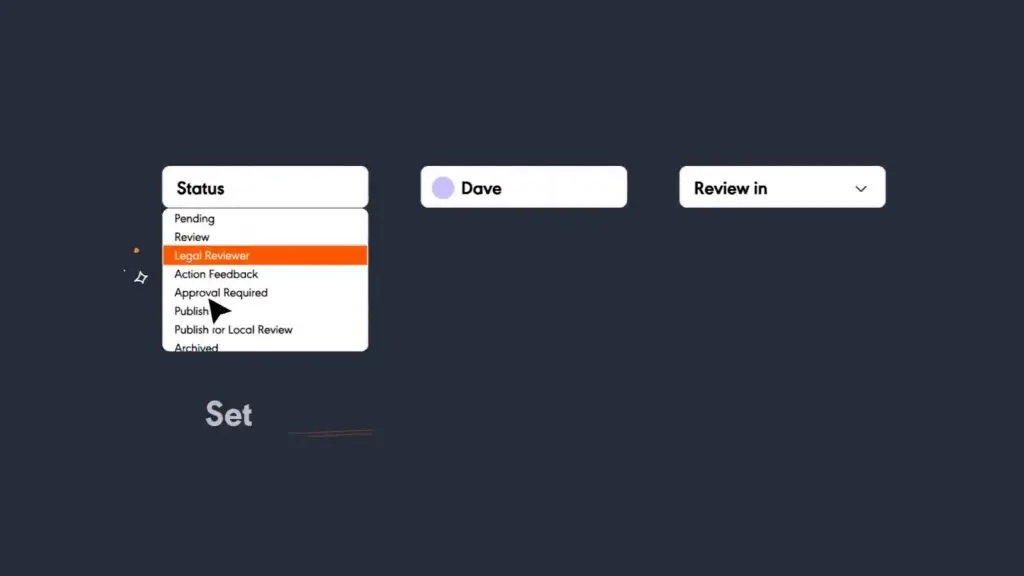
In regulated industries, every single answer carries compliance risk. Regulators actively monitor whether the company follows compliance standards to safeguard consumers. And outdated or unapproved information can trigger violations that carry real financial and legal consequences.
livepro offers a built-in governance framework that helps teams manage the content lifecycle, from creation to publication and expiry. Here’s how the platform builds governance into your knowledge base:
- Articles get an assigned owner and a scheduled review date for periodic updates, so review dates trigger reminders.
- Version control logs every edit, who made it and when, and lets knowledge managers restore a prior version in one click if a mistake goes live.
- If a review date passes with no action, livepro flags the article and retires it from the knowledge base until someone reviews it.
- Role-based permissions limit who can draft, edit, or approve content, so compliance-sensitive articles only move through people authorized to touch them.
Every article also passes through subject-matter-expert approval before publication, with a full audit trail attached to each stage.
This gives teams a single source of truth. Agents pull from the same approved content regardless of who’s on shift, so customers get a consistent answer instead of one that depends on who picked up the call.
Analytics to Surface Knowledge Gaps Before They Become Repeat Calls
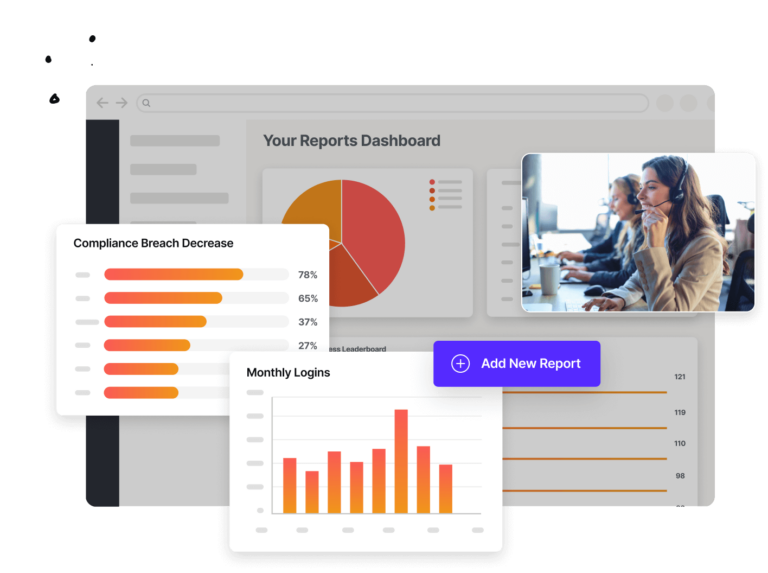
livepro gives teams real-time data on agent performance, content gaps, and how knowledge is used across the call center. The platform helps you track:
- Search analytics: Flags failed searches and vague queries, showing which content gaps to close first.
- Article-level analytics: Tracks views and interaction patterns to show which articles are helping agents and which ones need a rewrite.
- Trending searches: Surfaces what agents and customers are searching for most, so knowledge managers can spot emerging issues.
- Feedback tools: Let agents flag issues directly from an article they’re using, routing the feedback straight to the owner.
- Custom reporting: Ties usage trends and search behavior back to core metrics, including AHT, FCR, compliance accuracy, and self-service deflection.
For example, the analytics show that searches for “wire transfer daily limit” spike every month-end but return a high failed-search rate. This indicates there’s no article on this or agents can’t find the right answer.
The data can be redirected to the content team, who creates new articles using authoring tools directly on livepro, or can upload existing articles into the knowledge base.
Bottom Line: Cut Call Volume With Better Knowledge Management with livepro
Call centers need to deliver verified answers faster, resolve complex queries, and cut repetitive calls without extra handoffs. Most teams try to solve this by adding staff, deploying more tools or layering on AI. But that doesn’t fix the high call volume.
livepro is a call center knowledge management system that offers intelligent search, self-service solutions, governed content, and decision trees. Agents find accurate answers during live interactions, while teams offload repetitive calls with Luna AI and remove friction from the customer journey.
Book a demo to learn how livepro replaces scattered documents with governed, searchable knowledge that call center teams can trust during live calls.
FAQs About How to Reduce Calls In a Call Center
How does a knowledge base reduce call volume?
A knowledge base gives agents and customers access to the same accurate, verified answer in real time. When the first agent gets the answer right, the customer doesn’t need to call back for the same issue, which cuts repeat calls directly.
livepro offers a centralized knowledge base that lets agents, internal teams and customers pull answers from the same source. Intelligent search reads the intent behind a question to surface the right answer, so customers find what they need.
What is call deflection vs. call suppression?
Call deflection gives customers a real path to resolve their issue without picking up the phone, like an accurate self-service portal or a searchable FAQ that answers the question. Call suppression hides the option to call through tactics like burying the phone number or trapping customers in a chatbot loop.
Deflection reduces genuine need for a call, while suppression just delays or worsens the call that was going to happen anyway.
How can contact centers reduce average handle time without rushing agents?
Handle time drops when agents spend less time searching for the right answer. Fast, reliable search and guided workflows let agents move through a call efficiently. Rushing agents tends to backfire, since incomplete resolutions turn into callbacks that add more total handle time.
What causes repeat calls in a call center?
Repeat calls usually trace back to the first call being marked resolved when the underlying issue wasn’t fixed. This often happens because the agent provided the wrong answer. A high callback rate within seven days of the original call is one of the clearest signals this pattern is happening.