







Contact center leaders are not struggling with agent skills. They are struggling with the volume of information agents must sort through while customers wait. When agents move between long PDFs, outdated SOPs, and scattered tools, even simple inquiries slow down. During peak hours, these gaps create pressure that coaching alone can’t fix.
CX knowledge assist solves this by giving agents the guidance they need in real-time. CX knowledge assist judges intent, connects it to verified knowledge, and removes the delays caused by manual search.
This article explains how CX knowledge assist works in contact center operations. We’ll discuss the steps that drive adoption, and the changes that improve accuracy, speed, and consistency across your contact center.
What Is CX Knowledge Assist?
CX knowledge assist is an AI-driven system that delivers context-aware answers to agents during live interactions. It goes beyond a static knowledge base by analyzing real-time intent, matching it to structured content, and presenting guidance directly in the workflow.
Unlike a traditional knowledge base, where agents manually search documents, knowledge assist automates retrieval and suggests the correct content without interrupting the conversation.
Here are the core components of CX knowledge assist:
- Knowledge base: The structured, verified repository of articles, FAQs, guides, and process flows that forms the foundation of the system.
- AI retrieval engine: Uses natural-language processing (NLP) and search algorithms to match intent to relevant knowledge rapidly.
- Real-time suggestions: Prompts and recommended responses appear during an agent’s interaction, reducing search time and decision latency.
- Conversational context: The system tracks the flow of the conversation, understands follow-up questions, adjusts suggestions accordingly, and learns from feedback.
Why Does Your Contact Center Need CX Knowledge Assist?
According to a Deloitte report, companies using AI are 35% less likely to have agents feel overwhelmed by information during calls.
The core challenge is that agents can’t access accurate knowledge fast enough during live interactions. Most answers sit in long documents or separate systems, which forces agents to search, switch screens, and interpret policy text in real time.
Here’s why your contact center needs CX knowledge assist:
Reduced Average Handle Time (AHT)
AHT rises when agents pause to interpret policy language or scroll through outdated documents. Knowledge assist provides a verified answer the moment the customer explains their issue. This shortens the time agents spend deciding which article, rule, or step applies to the customer’s situation.
Increased First Call Resolution (FCR)
Knowledge gaps are a major cause of repeat calls and avoidable escalations. When agents follow guided steps and receive complete information, they resolve issues on the first attempt. This stabilizes workloads and reduces queue pressure.
Better Consistency and Compliance
Without assistive guidance, two agents can give two different answers to the same question. This creates compliance risk, especially in regulated industries.
A knowledge assist shows the same approved content to every agent, regardless of experience or shift. This reduces variation in answers, keeps responses aligned with current policies, and supports consistent compliance even when procedures change.
Faster Agent Onboarding and Training
Agent assist tools help new hires reach competency sooner by guiding them through tasks instead of relying on memorization. This reduces supervisor dependency and shortens ramp-up time, which is critical during high-volume hiring cycles.
Higher Customer Satisfaction (CSAT)
Customer satisfaction (CSAT) improves when customers get their issues resolved quickly with accurate information.
A customer experience (CX) knowledge assists this through clear information, short handling time, and consistent responses across agents and channels. It gives agents one place to find current policies, product details, and troubleshooting steps. Agents spend less time searching, make fewer mistakes, and can resolve more issues in a single interaction.
How to Implement CX Knowledge Assist: A Step-by-Step Process
CX knowledge assist works only when the knowledge behind it is structured, accurate, and easy to retrieve. Before agents receive real-time guidance, you need content, integrations, and a process that supports ongoing knowledge updates.
Here are some implementation steps for an effective customer call center experience strategy:
Audit Your Existing Knowledge
Start by reviewing the knowledge sources your agents depend on during live interactions. The goal is to confirm what is current and structured enough for AI retrieval.
Focus on the content that directly affects handle time, resolution paths, and compliance.
Here are the most important documents and content types to audit:
- Policy documents for billing, payments, refunds, and account changes
- Troubleshooting guides and escalation workflows
- Product or service reference sheets used during calls
- Long-form SOPs that require interpretation
- Compliance steps for regulated or high-risk processes
- Knowledge articles with unclear titles or inconsistent formats
This audit shows what is ready for knowledge assist and what needs to be revised into agent-ready content.
Design Your Information Architecture
Organize your knowledge so agents and AI can retrieve answers fast. Use a structure that is predictable, consistent, and easy to scan during live interactions. Prioritize these elements to improve accuracy and retrieval:
- Article structure with one purpose per article
- Consistent titles that match the exact question or task
- Defined tagging rules for topic, product, and process
- Standard templates for uniform formatting
- Content ownership assigned to specific teams
- Regular review cycles for high-use content
A solid information architecture allows knowledge assist to match intent to the right content without delays.
Integrate Intelligently
Connect your customer service knowledge management software with the platforms agents rely on during day to day work. Knowledge assist works best when answers appear in the same place agents handle customer tasks, not in a separate window or tab.
Prioritize integrations that impact speed and accuracy:
- CRM platforms where agents update accounts and resolve cases
- CCaaS and telephony systems
- Chat and messaging tools used in digital service channels
- Authentication and SSO for secure access
- APIs that trigger knowledge based on customer context or actions
Integration lets knowledge assist support agents at the exact point of need, reducing screen switching and decision delays.
Train People and the System
Introduce knowledge assist early and make agents part of the rollout. They know where information is missing, where steps break, and where guidance must be sharper. Their input helps shape content and improve accuracy.
You can use real customer scenarios to teach the system how to match intent to the right knowledge. Encourage agents to flag unclear articles, missing steps, or outdated rules. This feedback helps refine retrieval quality and builds trust in the tool.
Training should also focus on how agents interpret prompts, follow guided steps, and rely less on memory.
Measure and Iterate
Use analytics and reporting templates to track how well CX knowledge management supports your team. Monitor core indicators such as AHT, FCR, CSAT, search patterns, and article usage. These insights help you adjust content, improve tagging, and keep the assist layer aligned with daily needs.
How livepro Enables Effective AI-based CX Knowledge Assist
Knowledge assist relies on fast retrieval, structured content, and guidance that appears at the exact point of need. livepro is a knowledge management platform built for contact centers and enterprises.
Here are livepro’s key features that strengthen CX knowledge assist and help agents work with more clarity:
Lightspeed Search for Intent-Based Knowledge Retrieval
Call center agents lose time when search tools expect exact keywords or return long lists of loosely related results. During busy periods, these delays add up and force agents to:
- Skim documents
- Interpret policy language
- Ask a supervisor for confirmation
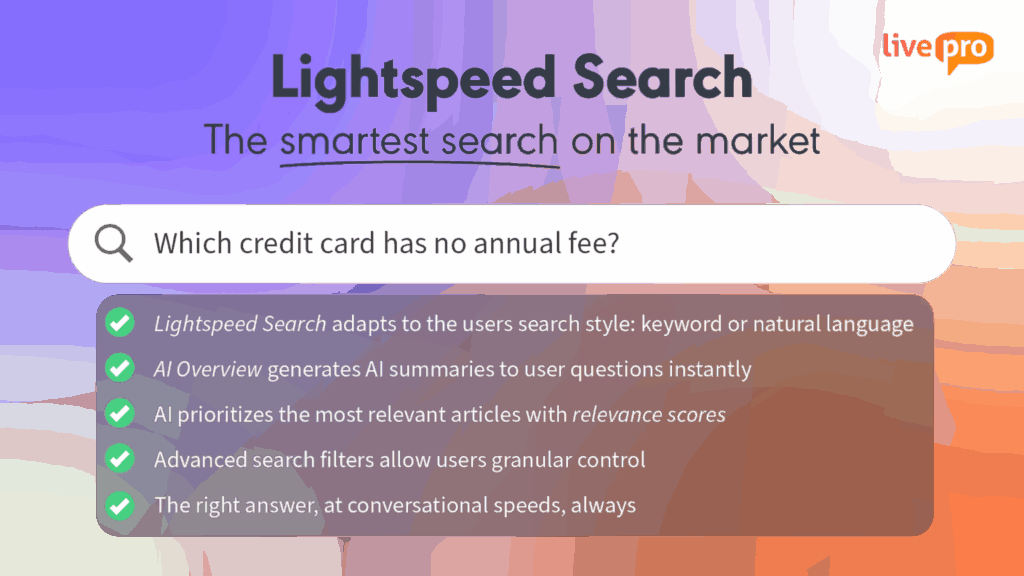
CX knowledge assist relies on accurate retrieval. livepro offers Lightspeed search that uses a hybrid AI model to understand natural language, partial phrasing, and true intent.
Instead of matching keywords, it interprets what the agent is trying to find and surfaces the most relevant, approved answer.
For example, if an agent types “how to waive late fee,” the system recognizes the intent and pulls the verified article with eligibility rules, required steps, and the approved explanation.
Consistent Resolutions with Rocket and Process Guidance
CX teams handling complex customer scenarios face these challenges:
- Difficulty following multi-step or exception-heavy processes
- Agents relying on memory to handle uncommon or high-risk tasks
- Slower resolutions when agents search for the correct next step
Without structured guidance, agents follow different approaches to the same query, leading to slower handling and uneven outcomes.
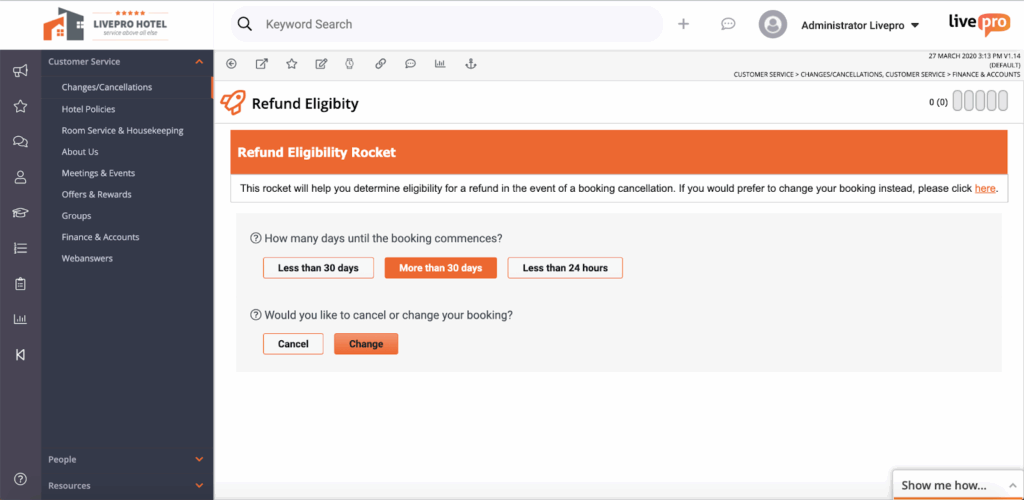
livepro addresses these issues with Rocket and Process Guidance, providing agents with clear paths to follow. Here’s how they work:
- Rocket: Rocket adapts to each customer response and guides the agent through dynamic decision pathways. Agents answer one question at a time, and Rocket presents the next step based on that answer.
- Process Guidance: Provides step-by-step instructions for workflows that must follow a specific sequence. It offers scripting support and quick-click steps for experienced agents. This keeps processing accurate and reduces training time.
Answer Articles for Single-Source Responses
When a single document contains policy details, exceptions, and internal notes, agents must decide which part applies. This slows responses and increases the chance of giving the wrong information.
livepro solves this with Answer Articles, a format that turns each question or task into a verified entry that agents can use immediately.
Here’s how Answer Articles help:
- One question, one answer, with no unrelated details
- Plain, direct wording written for fast responses
- Approved content that ensures accuracy and compliance
- Predictable structure that agents can scan instantly
- Minimal cognitive load, reducing hesitation during customer conversations
For example, if a customer asks about a delivery delay, the agent opens an Answer Article showing the current timeframe, approved explanation, and required next steps.
Profiles, Quizzes, Favourites, and Team Branding for Faster Agent Adoption
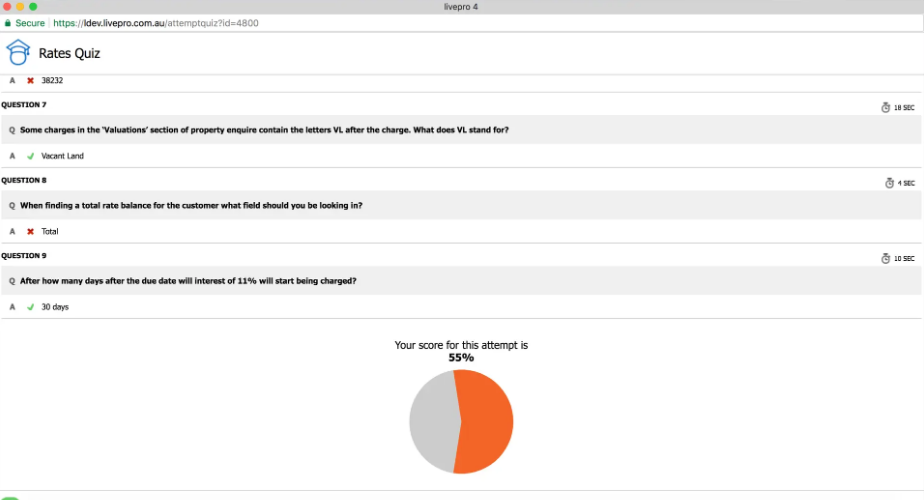
When the workspace feels rigid, generic, or hard to navigate, agents lose interest. They rely on workarounds instead of approved knowledge sources.
livepro supports adoption by giving agents simple tools that fit naturally into their daily workflow. These features help agents stay organized, keep knowledge easy to access, and reduce friction during busy periods:
- Profiles: Agents adjust their layout and viewing preferences to create a workspace that suits how they work.
- Quizzes: Short knowledge checks help teams stay updated on new policies or changes without long training sessions.
- Favourites: Agents save frequently used articles to a quick-access list, reducing search time and helping them work faster.
- Team Branding: Teams can apply company branding so the knowledge environment matches the organization’s style and feels consistent with internal tools.
Integrations to Deliver Knowledge Directly Inside Agent Workflows
Knowledge assist works best when guidance appears in the same system where agents manage customer interactions.
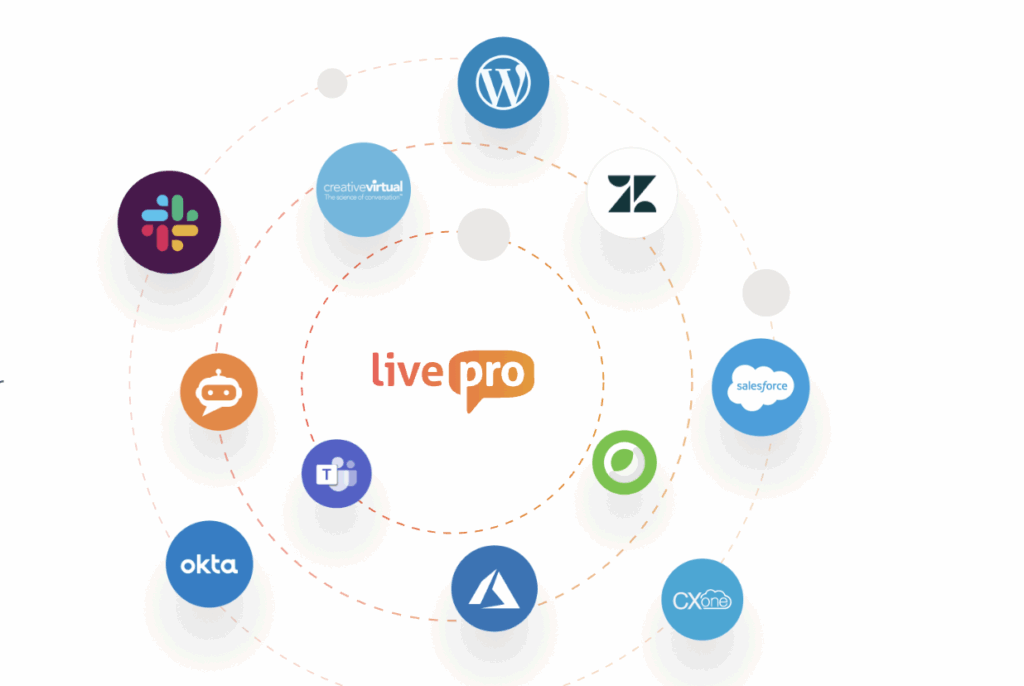
livepro integrates with the platforms call center teams already use:
- Salesforce
- Zendesk
- Microsoft Teams
- Slack
- NICE CXone
- Genesys Cloud
livepro also offers an open API and Single Sign-On (SSO) for streamlined access. Knowledge appears directly inside the agent’s existing interface, so answers and process steps surface without leaving the workflow.
How Hornsby Shire Council Cut AHT to Under 3 Minutes with livepro
Hornsby Shire Council in New South Wales serves over 140,000 residents. Its customer service team handles inquiries about council services, permits, community programs, and local operations. Before livepro, agents struggled with outdated knowledge systems that slowed responses and frustrated both staff and residents.
The Problem
Agents relied on physical binders with scripts, instructions, and supporting documents. This created major problems:
Calls lasted up to 10 minutes as agents searched for answers. Binders lacked search functionality and required constant manual updates. New staff needed several months of one-on-one coaching to learn the system. Agents couldn’t quickly locate procedures, which hurt service quality.
The Solution
Hornsby Shire Council implemented livepro to centralize knowledge in one searchable platform. The system was live in under a week with no disruption to operations. Initial training took minutes, not months. Agents could now search and find verified answers instantly.
The Results
Within weeks, all operators were fully trained and confident with livepro. Average Handle Time dropped to under 3 minutes, less than half the previous time. New agent training decreased by two weeks. Knowledge updates became simple to manage and deploy. Agents resolved more issues on the first call.
“livepro is a game changer. It is a powerful tool that empowers and gives confidence to your Customer Service Officers to provide consistent information to customers efficiently and competently.” – Jacqui Tomlins, Customer Service Manager, Hornsby Shire Council
Future Trends in CX Knowledge Assist
As CX technology evolves, several developments will shape how knowledge-assist tools support both agents and customers. Below are the key trends expected to influence the next phase of CX knowledge assist:
Multimodal Support and Real-Time Intent Detection
CX knowledge assist is moving beyond text-only interfaces. Future tools will combine voice, screen collaboration, and real-time intent detection to support more natural, efficient interactions.
Multimodal systems will be able to listen to a conversation, interpret what the customer is trying to achieve, and surface guidance before the agent searches for it.
As these capabilities develop, contact centers will shift from cost centers to value centers, tracking customer lifetime impact, retention, and revenue protection alongside operational metrics.
Voice Biometrics for Secure Authentication
Security and speed will converge as voice biometrics becomes a core part of contact center authentication. Future knowledge-assist tools will integrate voiceprint verification to:
- Reduce ID&V time
- Lower fraud risk
- Personalize the knowledge surfaced once the caller is verified
This shifts authentication from multi-step questioning to near-instant recognition, creating a smoother agent and customer experience.
Behavioral Economics Driving Knowledge and CX Design
Behavioral economics will shape how knowledge is written, structured, and delivered. Future tools will apply behavioral principles to present information in ways that support decision-making and reduce cognitive effort.
Examples of how this trend will influence CX knowledge assist include:
- Guidance written to reduce cognitive load
- Phrasing that builds trust and reduces friction
- Steps designed to minimize perceived effort
- Recommendations based on psychological drivers like reciprocity or loss aversion.
Alignment Between Customer Experience (CX) and Employee Experience (EX)
Future knowledge-assist platforms will strengthen the connection between CX and EX, recognizing that employee experience directly affects service quality. We’ll see EX–CX alignment through:
- Employee-centric knowledge environments
- Shared feedback loops
- Integrated performance and wellbeing insights
Bottom Line: livepro is the Best CX Knowledge Assist System for Contact Centers
When agents can’t locate the right information or follow the correct steps, handle time increases, errors rise, and customer experience suffers.
livepro gives contact centers a structured knowledge system designed for live interactions. Its answer-ready articles, guided processes, fast search, and strong governance help agents respond clearly, follow the right steps, and resolve issues without delays.
Book a demo to see how livepro improves knowledge access and supports better performance in contact centers.
FAQs About CX Knowledge Assist
Why is Knowledge Assist essential for contact centers?
Knowledge assist improves efficiency in contact centers by giving agents fast access to accurate information. This reduces hesitation, cuts down manual searching, and helps teams deliver consistent customer experiences.
How does Knowledge Assist support scalability?
Knowledge Assist runs on a cloud-based, scalable infrastructure that can handle growing inquiry volumes and expanding knowledge libraries without affecting performance.
Can Knowledge Assist be tailored to different organizations?
Yes. Organizations can configure article structures, workflows, integrations, and access rules to match their operational needs in contact centers.
Does Knowledge Assist reduce new agent training time?
Yes. With guided steps and clear knowledge paths, new agents spend less time memorizing processes and more time learning how to use the system effectively.