

New agents often escalate calls they should be able to resolve. Not because they lack training, but because the answer sits across multiple documents, and no one can scan a 10-page policy mid-call.
A call center decision tree fixes this by turning branching policies into a guided path: one question, one answer, one next step. This ensures the agent follows the logic instead of memorizing it.
Building a decision tree isn’t hard on its own, but keeping it accurate as policies change is where most teams fail.
In this article, we’ll walk through how to build a call center decision tree and how to keep it from going stale at scale.
What is a Decision Tree?
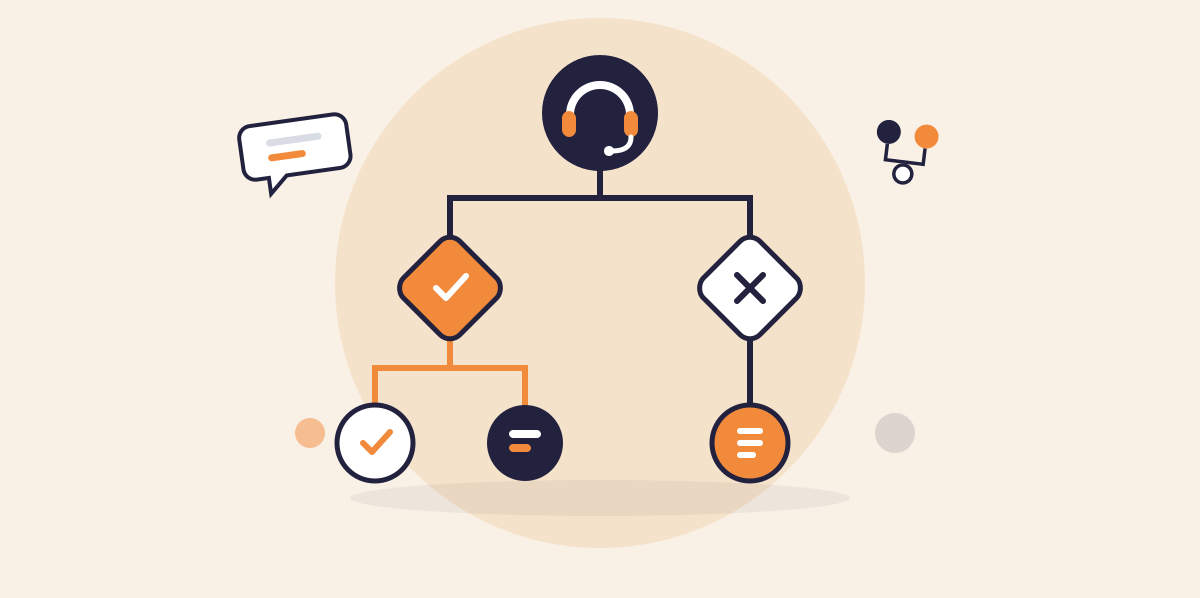
A decision tree is a structured, branching guide that breaks a complex process into a sequence of smaller decisions. Each decision point leads to the next based on the answer, and each answer narrows the path until the user reaches a specific outcome.
In a call center, the principle is the same. An agent receives a customer call. The decision tree starts with one question. The customer’s answer determines which branch opens next, and that branch leads to the next relevant question.
Unlike call scripts, each step depends on the previous answer since the decisions are interdependent. A decision tree maps that chain, so the agent only sees the next relevant step.
Why Do Call Centers Need Decision Trees?
Deloitte Digital’s 2024 survey found that 3 out of 4 contact center leaders say their agents are overwhelmed by systems and information during calls. That’s because the information they need is buried across disconnected tools and documents that aren’t built for real-time use.
Policies are in PDFs, internal wikis, or long knowledge articles. During a live call, scanning a 10-page document to find the right clause is not realistic. Experienced agents build mental shortcuts over months. New hires don’t have that advantage. They either spend too long searching or give an answer based on incomplete information.
Decision trees solve this by giving agents a structured, step-by-step path through every scenario, one question at a time. The agent doesn’t need to memorize every policy branch or interpret a wall of text mid-call. The tree handles the logic, while the agent follows it.
Common Use Cases of Call Center Decision Trees
Decision trees work best when the resolution depends on multiple variables that branch in different directions. The more complex the query, the more value a decision tree adds.
Here are the most common scenarios where call centers use them.
Claims and Inquiries
A patient calls a health insurance contact center about a denied claim. The denial could stem from a lapsed policy, an out-of-network provider, a missing pre-authorization, or an exceeded benefit limit. Each cause requires a different resolution path.
A decision tree walks the agent through qualifying questions in sequence.
- Is the policy active?
- Was the provider in-network?
- Did the procedure require prior authorization?
Each answer narrows the path to the correct next step instead of leaving the agent to scroll through policy documents mid-call.
Billing Disputes and Payment Issues
Billing calls carry high variability. The correct resolution depends on the type of charge, whether the customer is within a dispute window, the payment method used, account standing, and the applicable refund or credit policy.
A single billing question can branch into six or seven outcomes. A decision tree walks the agent through each variable in sequence: Is this charge from the last 30 days? Is the customer on a contract or prepaid plan? Has a previous adjustment already been applied to this account?
Each answer triggers the next relevant question. The agent doesn’t need to recall which policy applies to which scenario. The tree routes them to the correct outcome.
Cancellations and Retention
A customer leaving over price gets a different retention path than one leaving over service quality or contract terms.
A decision tree structures this conversation around the customer’s stated reason. If the issue is pricing, the tree can surface available discounts or plan downgrades. If the issue is a service complaint, it routes to a resolution flow before offering retention options.
This allows agents to follow the logic instead of improvising, and every customer gets a response that matches their specific situation.
Compliance-Driven Processes
Regulated teams in financial services, healthcare, and government must follow specific steps in a specific order to reach the right outcome. This includes Identity verification, regulatory disclosures, and data handling procedures.
Decision trees enforce the required process. Each step must be completed before the agent can move to the next. The tree doesn’t allow shortcuts or reordering.
This is critical for audits, where organizations need to demonstrate that every interaction followed the correct procedure.
Onboarding New Agents
New agents face the steepest learning curve in a call center. They need to learn dozens of processes with multiple branching outcomes, and they need to apply that knowledge during live calls from day one.
A decision tree compresses the ramp-up period. Instead of memorizing every policy and exception, new hires follow the guided path the same way experienced agents do. They build process knowledge on the job, one call at a time, without the risk of giving incorrect resolutions while they learn.
How to Build a Call Center Decision Tree: Step-by-Step Guide
Building a decision tree starts with understanding which problems cost the most time. Not every call type needs a tree. The ones that do share a common trait: multiple variables that lead to different outcomes depending on the customer’s situation.
Here’s how you can build a call center decision tree:
Identify High-Volume, High-Complexity Call Types
Start with the calls that generate the most escalations or the longest handle times. Pull data from your ACD or quality management system.
Look for patterns: which call categories involve the most transfers to supervisors? Which ones have the highest repeat contact rates?
These are the processes where agents struggle most with branching logic. A billing dispute tree or a claims resolution tree will deliver more impact than a tree for a simple address change.
Map Every Decision Point and Outcome
Work with subject matter experts and senior agents to document the full logic of each process. Start with the first question an agent needs to ask and map every possible answer. Each answer creates a branch. Each branch leads to another question or a resolution.
Don’t skip edge cases. If a branch exists in real calls, it needs to exist in the tree. A missing path means an agent hits a dead end mid-call and defaults to an escalation.
Choose a Tool Agents Can Use During Live Calls
Mapping the logic and using it on a live call are two different jobs. The tool you pick decides whether agents can click through the tree or just stare at a diagram.
Most teams choose from three options:
- Flowchart tools: Good for mapping logic with subject matter experts. But agents can’t click through a static diagram mid-call, and every update means redrawing and resharing the file.
- Standalone decision tree software: Turns your logic into a clickable, step-by-step flow. But it sits outside your knowledge base, so the answers in each node are copies. When a policy changes, someone has to update it in two places.
- Knowledge management platforms like livepro with built-in decision trees: The tree lives in the same system as your articles. Each outcome links back to the source content, so one update covers both.
Flowchart tools work fine for drafting with SMEs. But the version agents use should run step by step and connect to where your policies live.
Keep Each Step to One Question or One Action
Every node in the tree should do one thing. It either asks the agent a single question or instructs a single action. Overloading a step with multiple questions or conditions defeats the purpose of guided resolution.
For example, “Is the customer on a contract plan?” is one clear decision point. “Check the contract status and verify the payment method and confirm the billing cycle” is three steps crammed into one node. Split them.
Write Clear, Conversational Language at Each Node
Agents read decision tree prompts during live calls. The language needs to be direct and scannable. Avoid internal jargon, policy code references, or long instructional paragraphs inside a single node. Write each prompt the way an experienced agent would explain it to a new hire.
Connect the Tree to Your Knowledge Base
A decision tree that holds its own copy of a policy breaks the moment that policy changes. Connecting the tree means each node points back to the source instead of duplicating it.
Here’s what that looks like in practice:
- Link each outcome to its source article. Agents get the short answer in the tree and can open the full policy if the customer needs more detail.
- Pull answer text from the article, not a copy. If your tool supports it, embed the article content in the node so both update together.
- Give the tree and its articles the same owner. One person is responsible for keeping both accurate.
- Tag each tree with the policies it references. When a policy changes, you can find every affected tree in one search.
If your tool can’t link to your knowledge base, keep a simple register of which trees reference which articles. It’s manual, but it stops trees from drifting unnoticed. This matters most in regulated industries, where an outdated resolution path creates compliance risk.
Test with Frontline Agents Before Full Rollout
Run the tree through real call scenarios with the agents who will use it daily. They will identify gaps faster than any internal review. Missing branches, confusing prompts, steps that don’t match how the conversation flows on a call.
Start with a pilot group. Collect feedback on where agents get stuck or where the tree routes them to an incorrect outcome. Refine the logic based on that feedback before rolling it out across the floor.
Review and Update on a Set Schedule
Set automated review dates for decision trees. Assign ownership to a content team or knowledge manager. Track which branches agents use most and which ones lead to escalations. Use that data to improve the tree over time.
Where Decision Trees Fail (and How to Prevent It)
Most call center decision trees fail because they aren’t up-to-date or missing important policies. When you have a small content library, it’s easy to manage. You can track updates, catch outdated branches, and find mismatches between the tree and call patterns.
But that breaks down when you’re a large organization with multiple departments and large content libraries. A single decision tree might have 5 branches, each with different variables and outcomes. When a policy updates, teams can’t track which tree needs an update, so the entire process becomes more complex.
And if your decision tree is built separately from your knowledge base, your teams are forced to work with disconnected tools. The tree says one thing. The article behind it says another. Agents don’t know which to trust, so they default to what they remember or escalate the call.
You need a comprehensive system that helps you consolidate your content library and draw from the same knowledge base to create decision trees. It should support automated review cycles, approval workflows, version history, and assigned ownership.
Give Agents Decision Trees They Can Trust on Every Call With livepro
livepro combines decision trees with a centralized knowledge base. Agents follow the guided, branching workflows, and every branch pulls its answers from the same governed content.
livepro is an AI-powered knowledge management system built for contact centers. It targets highly regulated industries, such as healthcare, BPOs, banking, and local government, that need a governed knowledge base that connects to decision trees.
The platform helps contact center teams consolidate scattered knowledge and build decision trees from the same governed knowledge using a simple drag-and-drop editor. Every tree goes through an approval workflow before it’s published, so no content violates company compliance.
Here’s how livepro helps teams create a call center decision tree that agents can use:
Decision Tree Builder for Step-by-Step Agent Guidance
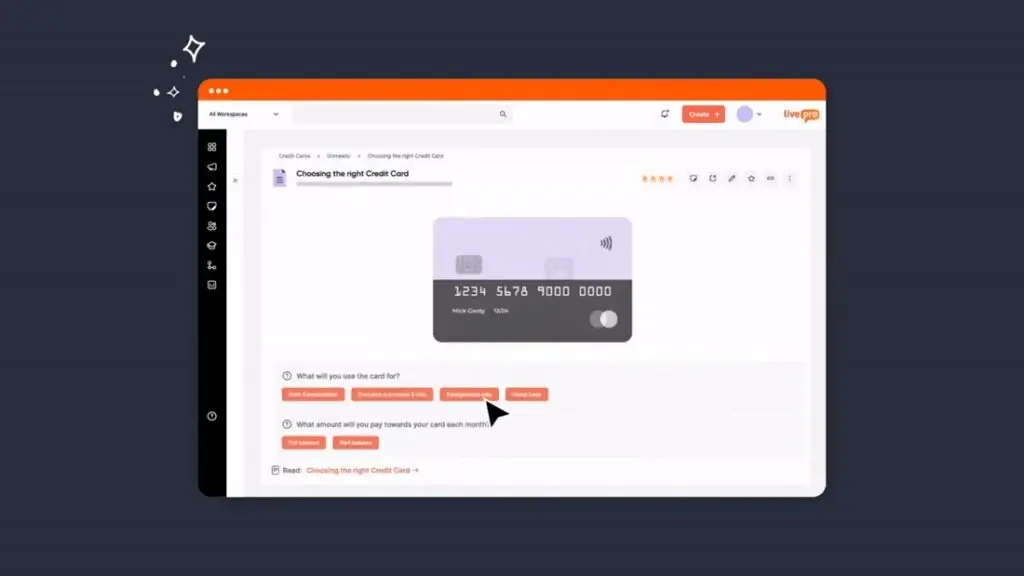
A customer’s question rarely has one answer. It depends on variables such as account type, location, contract terms, payment history, and eligibility status. The combination changes the outcome every time. And agents can’t work through every possible combination while a customer waits on the line.
livepro offers decision trees that break down complex processes into step-by-step guided workflows. Each node presents one question or one action. The agent answers, the tree moves to the next relevant step, and the path narrows until it reaches the correct resolution.
Your agent doesn’t need to read through a policy document or figure out which section applies. The tree handles that logic and walks them through it.
Authors can build a decision tree within minutes using a drag-and-drop editor. They map out decision points, add questions, link outcomes, and define each branch. When a policy changes, they update the affected branch directly in the editor and push it through the approval workflow. Every agent sees the updated path on their next call.
For example, a resident calls a local government contact center to dispute a property tax assessment. The decision tree walks the agent through property classification, exemption eligibility, appeal deadlines, and required documentation, each branching differently based on the resident’s situation. The agent resolves the dispute without interpreting the council’s tax code during a live call.
Role-Based Permissions and Approval Workflows for Scrutiny
A single error in a decision tree can affect every agent’s performance. If you use a flowchart model for a call center decision tree, it’s hard to keep track of content accuracy. The risk multiplies in highly regulated industries where a wrong resolution can trigger compliance violations.
livepro lets you control who can create, edit, review, and publish decision trees through role-based permissions. An author drafts the change. A reviewer checks it. An approver signs off before it goes live.
No content reaches agents without passing through the right people first. You can set different permission levels by department, team, or content type. This way, each group manages their own decision trees without access to content outside their scope.
Version Control to Keep Track of Content Changes
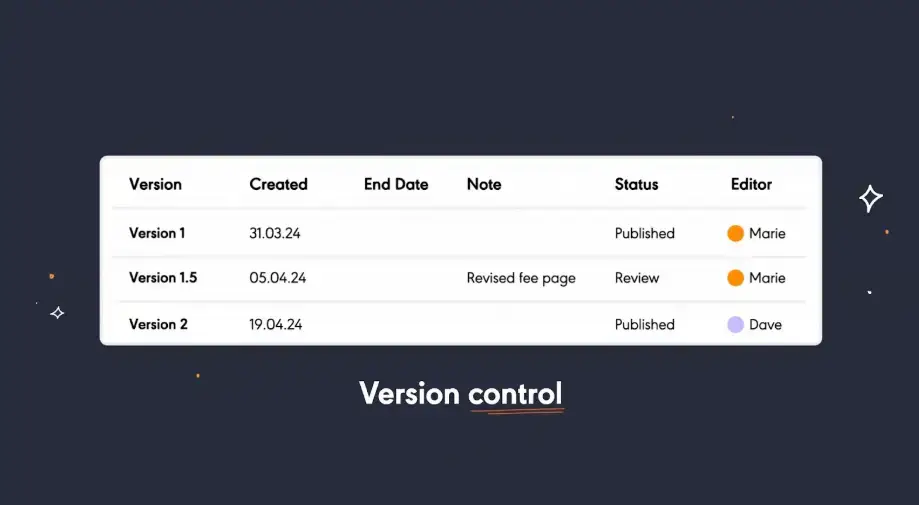
livepro maintains a full version history for every knowledge article. Every edit is logged with a timestamp and the author who made it. If a recent change introduces an error in the article, you can compare versions side by side or restore the previous one in a few clicks. This helps you keep your decision trees accurate.
For example, a financial services auditor asks which dispute resolution policy was active during a specific quarter. The compliance team pulls the exact version of that article, sees every change made to it, and confirms the content agents were working from.
Automated Review Cycles to Keep Content Up-to-Date
Decision trees have a lifespan. If you don’t review content on a timely basis, you risk agents following outdated branches that reference policies no longer in effect.
With livepro, you can set automated review dates for every article. When content is due for a refresh, the platform notifies the assigned owner automatically. If the article passes its review date without action, livepro removes it from the knowledge base so agents never work from expired content.
Knowledge Analytics to Identify Content Gaps
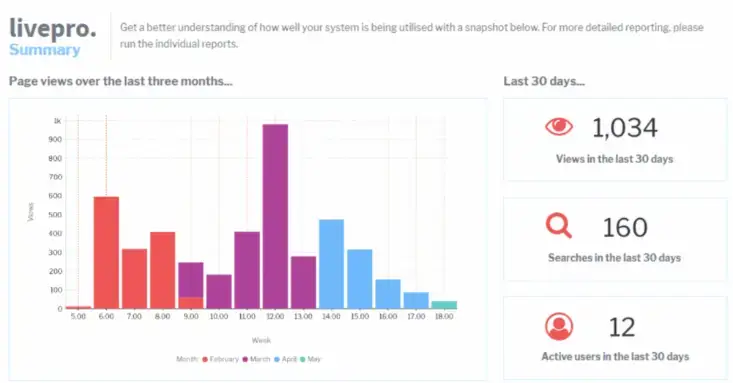
livepro offers knowledge analytics to track agent performance, content gaps, and article usage. It also surfaces trending searches, zero-result queries, and agent feedback scores.
Managers can see which topics come up most, where agents search unsuccessfully, and which content gets flagged for improvement.
For example, if a dashboard shows a spike in searches for a specific billing exception with no matching article or decision tree, the content team knows exactly where to focus next. That turns analytics from a reporting exercise into a content planning tool.
Resolve Complex Calls Faster With livepro
Creating a call center decision tree involves identifying complex call types, mapping every decision point, and writing clear prompts. When you have simple steps, it’s easier to create decision trees with branches.
But it’s hard to design a decision tree for multi-step processes with multiple variables and branching logic. Plus, frequent policy updates and compliance rule changes aren’t easy to track.
livepro connects your knowledge base with decision trees. Teams can drag and drop content in each branch, and visually track where content needs correction or update. You can assign roles, automate review dates, and make sure every decision tree is reviewed and approved.
Book a demo to see how livepro helps your team build decision trees that reduce handle time, cut escalations, and help new agents resolve complex calls faster from day one.
FAQs on Call Center Decision Tree
What is the difference between a decision tree and a call script?
A call script is linear, while decision trees are dynamic. In call scripts, the agent follows the same sequence regardless of the customer’s situation. A decision tree branches based on the customer’s responses, so the path changes depending on the variables involved.
Scripts work for simple, single-outcome calls. Decision trees work for complex calls where the resolution depends on multiple conditions.
How can a customer support decision tree help improve agent performance?
Decision trees reduce the guesswork agents face during complex calls. Instead of searching through documents or relying on memory, agents follow a guided path that leads to the correct resolution.
This lowers average handle time, reduces unnecessary escalations to supervisors and improves first contact resolution. New agents benefit the most because they can handle complex calls from day one without memorizing every policy and exception.
Can decision trees work for compliance-driven processes?
Yes. Decision trees enforce a fixed sequence of steps that agents must complete before moving forward. This helps prevent skipped steps, shortcuts, or reordering, which is critical for identity verification, regulatory disclosures, and data handling procedures.
How often should you update a decision tree?
Review decision trees every time a policy, product or compliance rule changes. Also, set a recurring review cycle, quarterly at minimum, to catch content that may have drifted without a specific trigger. Trees tied to frequently changing processes like billing or regulatory workflows may need monthly reviews.
How do you measure the effectiveness of a call center decision tree?
You need to track average handle time, escalation rate, and first contact resolution for call types that use decision trees. Compare those metrics against the same call types before the tree was introduced. A drop in escalations and repeat contacts is the clearest signal that the tree is working.
What features to look for in a call center decision tree software?
A call center decision tree software should offer a visual drag-and-drop builder and integrate with a centralized knowledge base. Pick a platform that includes role-based permissions, approval workflows, automated review dates, and version control, so you can keep your decision trees accurate.
How does a decision tree improve customer service in a call center?
A decision tree gives agents a guided path to the correct resolution on every call. Customers get accurate answers faster because the agent is not searching through documents or guessing which policy applies. It also reduces transfers and hold times, which are two of the biggest drivers of customer dissatisfaction. The result is a more consistent experience regardless of which agent picks up the call.