

Your FCR (First Contact Resolution) and AHT (Average Handle Time) targets aren’t improving because your agents waste time hunting for answers across multiple systems while customers wait on hold.
Policy updates arrive by email. Billing procedures live in a shared drive. Compliance scripts get posted in Slack. Your agents toggle between five different tools during every call, and that scattered knowledge directly impacts your performance metrics.
A call center knowledge management system consolidates every policy, procedure, and troubleshooting step into one searchable platform. Agents find answers in seconds without leaving their workflow. That’s what actually improves handle time, first contact resolution, and compliance accuracy.
In this article, we explain how a call center knowledge management system affects AHT, FCR, compliance, and onboarding.
What Is a Call Center Knowledge Management System?
A call center knowledge management system (KMS) is a digital tool that stores, manages, and delivers the information agents need to handle customer queries. It centralizes policies, procedures, troubleshooting steps, and scripts into one structured and searchable source of truth.
A call center knowledge management system usually includes:
- Searchable knowledge base
- Guided workflows and decision support
- AI-powered search and recommendations
- Governance and version control
- Analytics and optimization tools
- Integrations with CRM, telephony, and chat platforms.
The Operational Problems a Call Center Knowledge Management System (KMS) Solves
Even the best call centers deal with slow responses and inconsistent service because knowledge lives in scattered systems. Agents waste time searching across PDFs, portals, and email threads instead of helping customers.
Agents Searching Across Multiple Systems
Many contact centers still rely on shared drives, long PDFs, email updates, and outdated portals. Agents lose time jumping between tools to find a single answer. A purpose-built knowledge platform centralizes information and delivers it through one structured interface, reducing unnecessary searching.
Policies and Procedures Changing Faster
Product updates, pricing changes, and compliance adjustments happen regularly, but frontline teams often receive them through inbox messages or chat threads.
A centralized knowledge environment publishes updates instantly, applies review cycles, and makes sure only the approved version is visible to agents.
Inconsistent Responses Between Experienced and New Agents
Without guidance, new agents rely on guesswork, while experienced agents rely on memory. Both create variation in service quality. Structured knowledge ensures every agent follows the same approved steps, reducing dependency on tenure or personal notes.
Long Training Cycles Driven by Information Overload
When processes live in complex documents, training focuses heavily on memorization rather than practical application. A guided knowledge system shifts learning into the workflow, allowing agents to learn while handling real scenarios, which shortens training time.
Escalations Caused by Outdated Instructions
Supervisors often deal with avoidable escalations because agents didn’t have clear instructions for uncommon scenarios. Decision support and step-by-step guidance direct agents to the correct outcome, reducing uncertainty and unnecessary transfers.
Difficulty Identifying Knowledge Gaps
Without proper insights, leaders can’t see which topics create confusion, which articles underperform, or where failed searches occur. Built-in analytics highlight search behavior, unused content, and areas that need review, enabling proactive improvement.
Variability Across Teams, Queues, and Locations
Multi-site and hybrid call centers struggle to maintain consistency when each location stores or updates knowledge differently. A centralized system ensures all teams reference the same approved information.
Higher Compliance Risk During Peak Periods
During busy times, agents fall back on personal notes or outdated material to keep up with call volumes. A controlled knowledge source provides verified answers in real-time, which reduces compliance errors.
Features to Look for in a Call Center Knowledge Management System
A call center knowledge management system must support fast answers, reduce errors, and keep information consistent across every channel. The features below represent the functionality call centers rely on most, especially in high-volume or regulated industries:
AI-Powered Search and Intent Recognition
Agents need answers at the pace of a live call, not a document search. Gen AI in customer support interprets natural language, understands intent, and retrieves the most relevant content instantly. Beyond keyword matching, intelligent search also provides:
- Context-aware suggestions
- Summarized information for faster scanning
- Relevance-ranked results based on usage and accuracy
- Predictive recommendations aligned with the query.
This reduces time spent scrolling through long articles and ensures agents see the correct version of information first.
Guided Knowledge (Decision Trees, Workflows, and Scripts)
Complex processes lead to inconsistent outcomes, especially when agents rely on memory or personal notes. Guided knowledge tools, such as decision trees, step-by-step workflows, and approved scripts, walk agents through the correct path in real time.
This approach:
- Reduces errors during multi-step procedures
- Helps new agents perform at the same level as experienced ones
- Ensures compliance by enforcing required questions and disclosures
Prevents unnecessary escalations.Content Governance and Version Control
In call centers where policies change often, inaccurate answers lead to complaints, rework, and regulatory risk. Governance ensures content remains current, compliant, and traceable.
Key components include:
- Approval workflows before publishing
- Audit trails showing who changed what and when
- Version comparisons to track updates
- Automated review reminders
- Scheduled publication and expiry
This prevents outdated policies from staying live and reduces compliance risk.
Role-Based Access and Personalization
Different teams, billing, claims, retention, and complaints need different information. A well-designed knowledge system allows leaders to set permissions so each group sees only what’s relevant to their role.
Role-based access:
- Reduces information overload
- Prevents accidental use of the wrong process
- Improves focus and accuracy
- Supports specialized teams and multi-client environments
Personalization features can also display frequently used content or recommended articles based on the agent’s queue or skill set.
CRM and Telephony Integrations
Knowledge is most effective when it appears directly in the agent’s workflow. Integrations with CRM, ticketing, telephony, and chat systems eliminate the need for screen-switching.
An API-first design allows the knowledge system to:
- Surface answers inside CRM screens
- Display guidance during live calls
- Link knowledge with customer history
- Reduce duplication across tools
This creates a workflow where agents don’t need to leave the system they’re already working in.
Feedback Loop and Analytics Layer
Knowledge content needs regular updates, including pruning duplicates and clarifying articles that cause failed searches. Analytics help leaders see how content performs and where gaps exist. Contact center knowledge management systems track:
- Failed searches
- Low-rated articles
- Unused or outdated topics
- Patterns in agent behavior
- High-traffic content that may need refinement
Feedback tools allow agents to flag issues instantly, creating a cycle where knowledge is updated based on real usage.
KPIs a Call Center Knowledge Management System Improves
A call center knowledge management system directly impacts the speed, accuracy, and consistency of customer service. The following KPIs are the core metrics leaders use to measure whether their call center customer experience strategy is improving operational performance:
Average Handle Time (AHT)
AHT reflects the total time agents spend handling each interaction. When knowledge is structured, searchable, and easy to follow, agents spend less time looking for information. A call center knowledge management software reduces unnecessary delays, long holds, and post-call clean-up.
Training and Onboarding Time
A knowledge structure helps new agents learn processes faster. Instead of memorizing content during training, agents rely on guided knowledge during real calls, which shortens onboarding cycles and improves time-to-competency.
First Contact Resolution (FCR)
FCR measures how often an issue is solved on the first interaction. When agents have instant access to accurate, verified information and guided steps, they can resolve more queries without escalating or following up.
Customer Satisfaction (CSAT / NPS)
Customers remember how fast you resolve their issue and whether different agents give the same answer. Reliable knowledge supports clearer communication, fewer errors, and smoother resolutions, which directly improve satisfaction scores.
Compliance Accuracy
Policies, regulatory requirements, and process steps must be followed exactly. A structured knowledge environment helps agents reference the latest approved information, reducing compliance risks and incorrect advice.
Agent Confidence and Engagement
When agents can find what they need quickly, they feel more in control of their work. A well-designed system reduces frustration, increases confidence on calls, and supports higher overall engagement.
Knowledge Findability
Findability measures how quickly and accurately agents can locate the right information. Strong search performance reduces hesitation, minimizes screen-switching, and improves consistency across the team.
Self-Service Deflection
Accurate and centralized knowledge can be reused across customer-facing channels. When customers can resolve issues through FAQs, chatbots, or online portals, call volume decreases, and agents focus on more complex tasks.
How to Choose the Right Call Center Knowledge Management System
Most knowledge tools just add another tab for agents to click through. A useful knowledge management system improves key metrics like handle time, first contact resolution, and compliance.
Start with the outcomes you need: lower handle time, faster ramp time, better resolution rates, stronger consistency.
Then use this checklist to see if a system can actually deliver:
- Does it reduce average handle time (AHT) in a measurable way?
Look for evidence (case studies or pilot data) that handle time drops once the system is in use.
- Can new agents reach proficiency in under two weeks?
Guided knowledge and clear content formats should shorten training and reduce reliance on memorization.
- Is semantic / intent-based search built in?
Agents should be able to type natural phrases and still get the right answer, not rely on exact keywords.
- Does it support guided workflows and decision logic?
Complex processes should be handled through structured flows rather than personal notes or memory.
- Is content governance automated?
The system should include ownership, approvals, review dates, version history, and expiry.
- Can you control access by role, team, or client?
Role-based permissions are important in multi-team or multi-client environments.
- Does it integrate with your CRM, ticketing, and telephony platforms?
Knowledge should appear inside the tools agents already use.
- Are analytics detailed and actionable?
You should see search trends, failed searches, and article performance to guide updates.
- Are there proven results in a call center similar to yours?
Prioritize knowledge management software with documented impact in your industry or a comparable environment.
How livepro Cuts Handle Time and Improves First Contact Resolution
A call center knowledge management system has to do three things exceptionally well:
- Make answers instantly findable
- Guide agents through complex work
- Keep knowledge accurate and controlled at scale.
livepro is built around those exact needs. It turns scattered documents into a governed, searchable, and guided knowledge layer that sits at the heart of your call center.
Below are livepro’s key features that help call centers deliver a smooth customer experience:
Answer-Ready Articles Designed for Live Calls
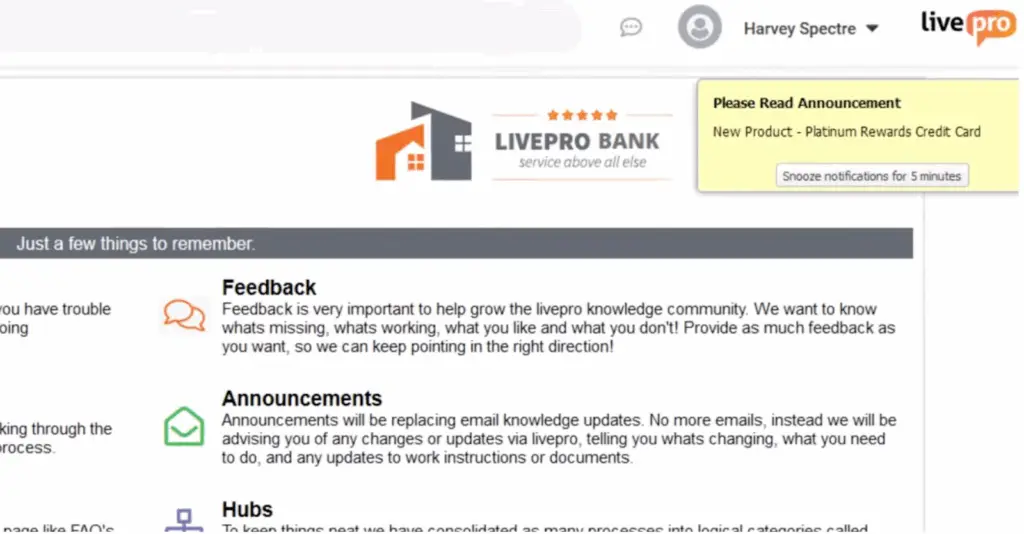
Agents need information they can use immediately during a conversation. Instead of long documents or detailed explanations, they rely on three key formats within livepro that are built for customer satisfaction:
- Answer Articles: Short and direct responses written for live call speed. Each article covers a single question with a verified answer, so agents don’t need to interpret or rewrite information.
- Process Guidance: Step-by-step instructions for processes that must follow a specific order. New agents can follow each step, while experienced agents can move faster using optional drop-down paths.
- Announcements: Time-sensitive updates displayed directly in the agent workspace. These keep staff informed about outages, policy changes, or temporary instructions without relying on email or chat.
For example, if a customer inquires about a delivery delay, the agent can open the Answer Article, which displays the approved explanation and the current timeframe. If further action is required, Process Guidance walks them through the exact steps to complete. These formats provide agents with reliable information at the pace of a live call.
Decision Guidance with The Rocket for Confident Decisions
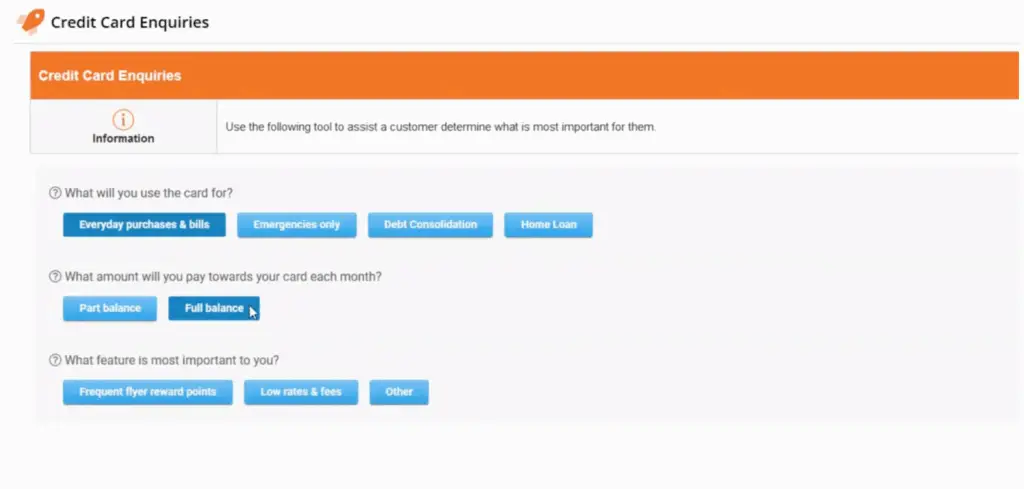
Some customer scenarios involve branching rules, eligibility checks, or exceptions that are difficult to manage from memory. To prevent inconsistent answers or unnecessary escalations, livepro offers The Rocket.
It’s a question-based flow that adjusts to each response the agent selects. It breaks complex processes into simple steps and leads agents to the approved outcome without requiring them to search through documents or interpret policy language.
Here’s how The Rocket works:
- It asks one targeted question at a time
- Each answer triggers the next relevant step automatically
- The flow narrows down until the correct resolution is reached
- All outcomes follow verified rules and compliance requirements.
For example, during a billing investigation, The Rocket guides the agent through questions about account status, eligibility, or exception scenarios. Each response moves the agent forward until the approved resolution (whether it’s a credit, denial, or escalation) is identified.
Navigation Across All Knowledge
During a live call, even a short delay in finding the right information can hurt handle time and customer confidence.
Agents can’t afford to scroll through long documents or guess which article is correct. livepro supports navigation through multiple complementary tools that make knowledge easy to access in seconds.
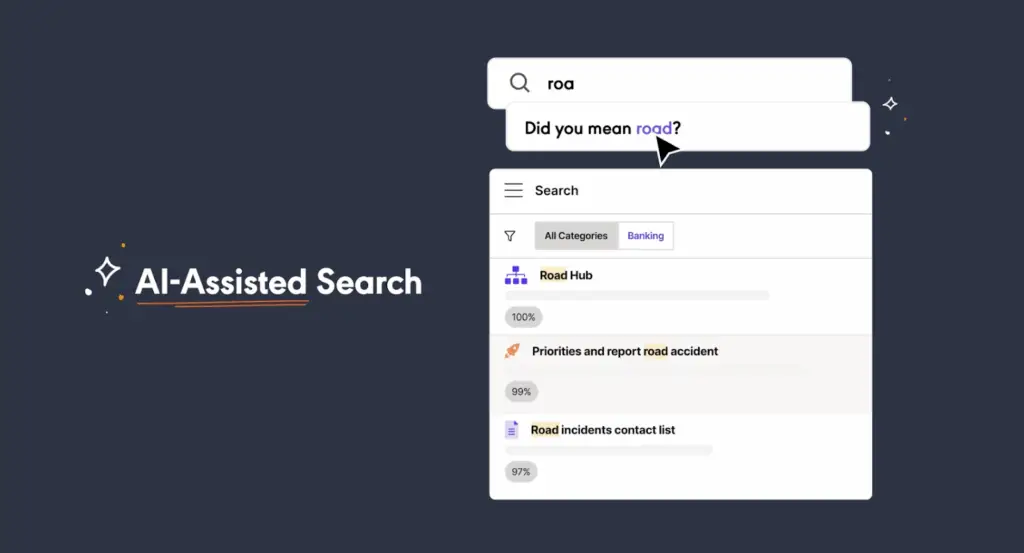
Lightspeed Search
An AI-driven search that understands intent, not just keywords. It interprets natural language queries and ranks the most relevant results at the top so agents see the right answer first.
Here’s what makes Lightspeed Search effective:
- Interprets partial phrases and everyday language
- Ranks results by relevance, recency, and accuracy
- Provides short summaries so agents can scan quickly
- Works across articles, workflows, and source documents.
Categories
A structured hierarchy that mirrors how call centers operate (by product, process, team, or queue). Categories make it easy for agents to browse familiar topics without needing to remember exact titles.
Hubs
Hubs are collections that bring all related knowledge together in one place. They are useful for launches, campaigns, outages, or seasonal changes, giving agents one central view of everything they need.
For example, during an annual pricing update, a “Price Change Hub” can hold updated FAQs, workflows, scripts, and escalation paths. Agents can browse the hub or find the same content through Lightspeed Search, for fast and consistent access from any path.
Authoring Tools That Keep Content Clean and Consistent

Knowledge is only useful when subject experts can create, update, and maintain it without leaving their daily tools. livepro’s authoring tools help knowledge managers and subject experts produce consistent content.
Here are the key tools available:
- Premade styles and templates that reduce formatting time and keep the entire knowledge base visually consistent.
- A WYSIWYG (What You See Is What You Get) editor that lets authors write and update content quickly. It supports images, links, and structured layouts that are easy for agents to read.
- Drag-and-drop decision authoring to build decision flows for the Rocket in a simple, visual way.
- Prebuilt templates for process guidance that make it easy to create step-by-step workflows with clear sequencing.
For example, when creating a new refund process, authors can select a process template, add steps in order, and adjust the flow visually. These authoring tools make it easier for teams to manage knowledge at scale while maintaining clarity across the entire system.
Governance and Compliance Built for High-Risk Industries
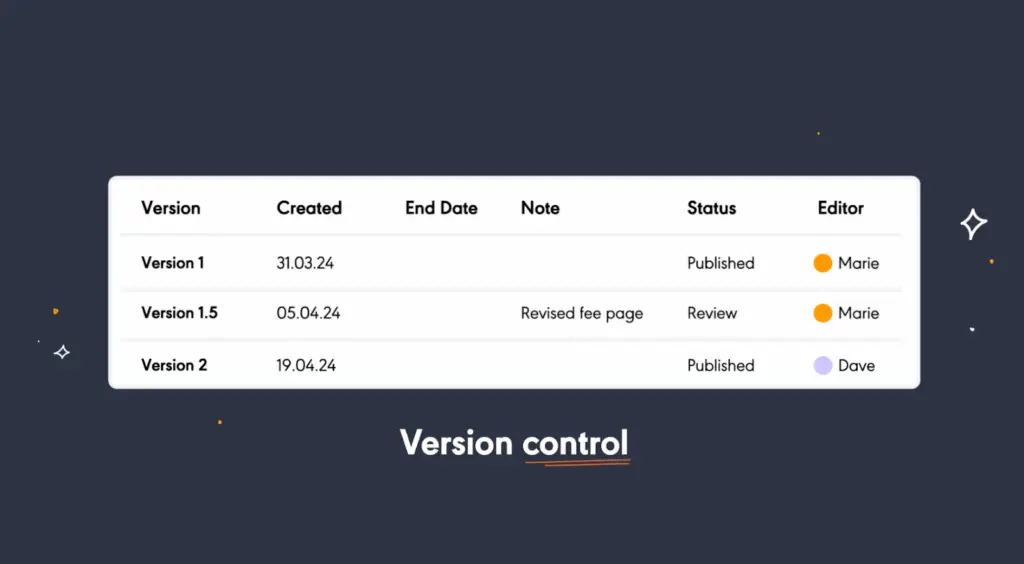
To keep knowledge controlled and compliant, livepro includes a set of governance tools that manage content from creation to retirement:
- Author–reviewer–approver sequence for every article before it’s published
- Version control and visual comparison to track changes, see who updated what, and restore previous versions if needed
- Role-based permissions to see who can view, edit, or publish content, preventing unauthorized changes
- Automated review reminders to revisit articles on a scheduled cycle, so nothing becomes outdated
- Scheduled publication and expiry to go live automatically and retire when no longer valid.
For example, when a new compliance requirement is introduced, knowledge managers can schedule the updated article to publish on a specific date while automatically expiring the old version.
Insights and Feedback for Continuous Improvement
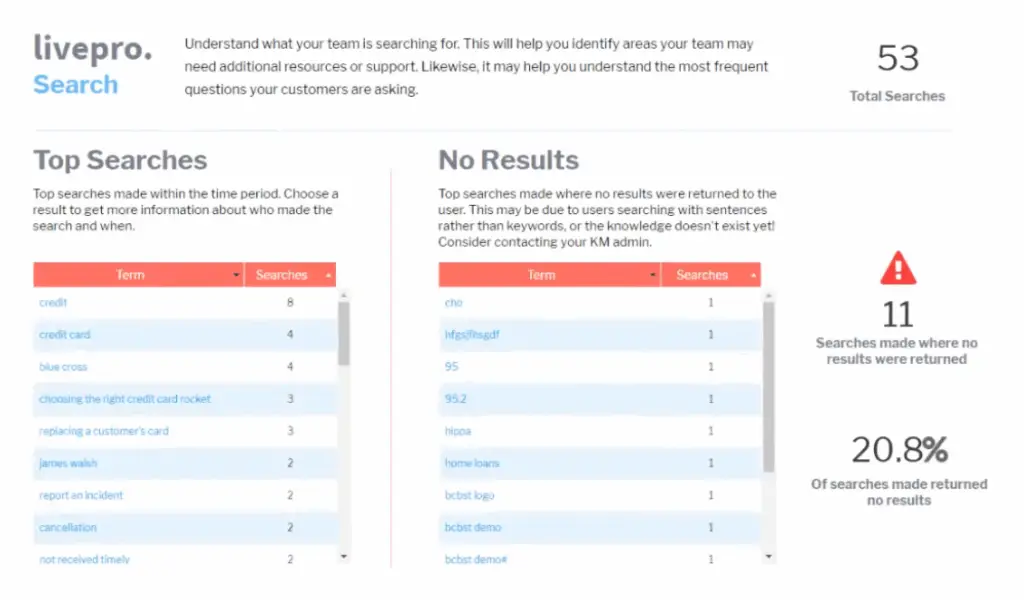
To support ongoing improvement, livepro surfaces search patterns, article performance, and agent feedback so you know what to fix.
Here are the key insights and feedback capabilities that keep knowledge aligned with operational needs:
- Dashboards and standard reports show usage trends, search behavior, and high-traffic content so teams can monitor performance at a glance.
- Search analytics highlight failed searches, vague queries, and topics that require clearer or additional content.
- Article-level analytics track views, time spent, and interaction patterns to reveal which content is helping and which may need refinement.
- Integrated feedback tools allow agents to flag issues, request updates, or suggest improvements directly from an article.
- Customizable reporting (Enterprise) enables leaders to focus on metrics tied to AHT, FCR, compliance accuracy, or other operational targets.
Integrations
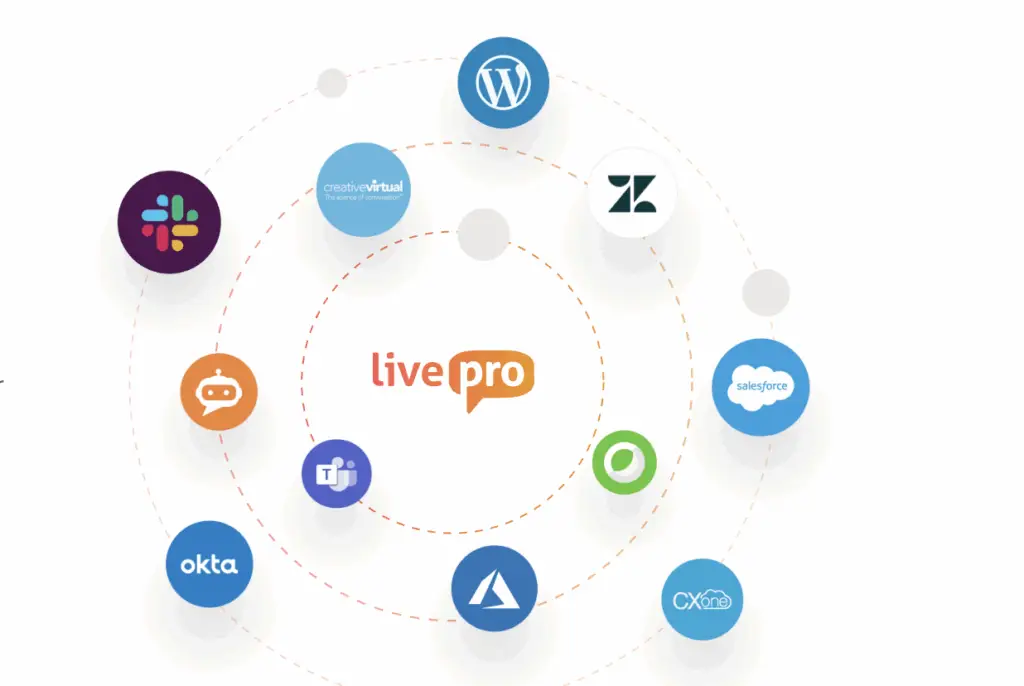
livepro integrates with the platforms call center teams already use:
- Salesforce
- Zendesk
- Microsoft Teams
- Slack
- NICE CXone
- Genesys Cloud
livepro also offers an open API and Single Sign-On (SSO) for streamlined access. Knowledge appears directly inside the agent’s existing interface, so answers and process steps surface without leaving the workflow.
Bottom Line: livepro is the Best Call Center Knowledge Management System
A high-performing call center needs a structured, reliable way for agents to access clear answers during live conversations. A purpose-built call center knowledge management system makes that possible.
livepro brings together answer-ready articles, guided decision tools, AI search, governance, and integrations to help teams work faster and deliver quality and consistent customer service.
Book a demo with livepro to see how it supports call center performance at scale.
FAQs
Why do call centers need a dedicated knowledge management system?
Call centers handle complex questions, fast-changing policies, and high call volumes. A dedicated knowledge system ensures agents always have the correct information, which improves handle time, accuracy, onboarding, and customer satisfaction.
How does a knowledge management system reduce average handle time (AHT)?
A knowledge management system reduces AHT by making answers easier to find through AI search, structured content, guided workflows, and clear instructions. Agents no longer spend time searching through long documents or checking multiple sources.
How does a knowledge management system support new agent onboarding?
New agents can rely on guided instructions and clear content instead of memorizing complex processes. This shortens training time and helps them reach proficiency faster.
Can a knowledge management system improve first-contact resolution (FCR)?
Yes. When agents have accurate and approved information in one place, they can resolve more issues during the first interaction without escalating or calling back.
Is a knowledge management system the same as a wiki or shared drive?
No. Wikis and shared drives store information, but they lack governance, guided workflows, semantic search, and structured formats needed for live call environments. A KMS is designed for speed and accuracy during real-time interactions.