


What are the best tools for managing corporate knowledge
Corporate knowledge management is the practice of capturing, governing, improving, and delivering the information people need to do their work accurately. The best tools combine searchable content, clear ownership, approvals, analytics, integrations, and AI-ready answers so knowledge does not get trapped in inboxes, PDFs, chat threads, or individual employees’ heads. If you are comparing knowledge base software, knowledge sharing platforms, and broader business information management systems, start with the workflow you need to improve: customer support, internal operations, compliance, onboarding, product documentation, or enterprise AI.
Which knowledge management tool fits your company best?
The right tool is the one your teams will actually use, trust, and maintain. For a contact center or service environment, prioritize governed answers, workflow guidance, omnichannel delivery, and accuracy. For a product, engineering, or internal operations team, prioritize collaboration, version history, permissions, search quality, and integration with the tools where work already happens.
Use this quick shortlist before you dive into the details:
| Best fit | Tool to consider | Why it stands out |
|---|---|---|
| Contact centers and AI-ready service knowledge | livepro | Governed answers from a single source of truth, delivered across channels and departments |
| Team wiki and collaboration | Confluence | Structured pages, templates, project collaboration, and Atlassian ecosystem fit |
| Verified knowledge in daily workflows | Guru | Governed knowledge layer, verification, and delivery across apps and AI workflows |
| Microsoft 365 organizations | SharePoint | Document libraries, intranet publishing, permissions, and Copilot capabilities |
| Flexible company wiki | Notion | Easy page creation, databases, connected search, and Notion AI |
| IT, HR, and enterprise service management | ServiceNow | Knowledge tied to service workflows, portals, virtual agents, and AI Search |
| Customer support self-service | Zendesk | Help center content connected to tickets, agents, and Zendesk AI |
| Product and technical documentation | Document360 | Public, private, and mixed knowledge bases with AI documentation features |
| Enterprise intelligence and AI context | Bloomfire | Governed context layer for enterprise knowledge, search, and AI agents |
| Lightweight internal wiki | Slab | Clean knowledge base experience with unified search across integrations |
| Customizable knowledge base | Helpjuice | Search, analytics, customization, AI features, and internal or external use |
1. livepro for governed, AI-ready knowledge across every channel
livepro is one of the leading tools for corporate knowledge management when accuracy, speed, compliance, and consistency matter. livepro knowledge management serves as the single source of truth for a company’s knowledge, giving teams one governed place to create, approve, update, search, and deliver correct answers. This is especially useful for contact centers, customer service teams, regulated organizations, and companies that need employees and customers to receive the same answer no matter where they ask. (livepro.com)
A major strength is omnichannel delivery. livepro connects to every channel and department the company has, without exception, so knowledge can flow into phone support, email, live chat, help desks, websites, self-service, virtual assistants, and the internal tools employees already use. Instead of copying the same information into multiple places, teams can maintain one approved answer and distribute it consistently across the business. (livepro.com)
livepro also connects to AI so organizations can adopt AI confidently with correct answers. Its AI capabilities are designed to draw from verified knowledge rather than leaving employees or bots to interpret scattered documents on their own. For companies exploring AI assistants, voice agents, or AI-powered search, that foundation matters: the quality of the AI answer depends on the quality, governance, and availability of the knowledge behind it. (livepro.com)
Key use cases include:
- Contact center answers: Agents can search in natural language and find accurate, approved responses quickly.
- Process guidance: Step-by-step instructions and decision guidance help newer staff handle complex scenarios.
- Compliance control: Permissions, version control, review workflows, audit trails, and scheduled publishing support governed knowledge.
- Self-service: The same knowledge base can support agents and customers, reducing inconsistency between internal and external answers.
- AI enablement: Verified knowledge can be connected into AI workflows so automation is grounded in correct information.
livepro is a strong choice if your biggest pain is not “we need somewhere to put documents,” but “we need every person, department, channel, and AI experience to use the same trusted answer.”
2. Confluence for collaborative documentation and team knowledge
Confluence is a strong option for organizations that want a flexible workspace for documentation, project notes, decisions, policies, and team knowledge. It is widely used as a collaborative wiki where teams can create pages, organize content into spaces, comment on work, and maintain shared documentation alongside projects. Atlassian positions Confluence as a place for ideas, docs, knowledge, and collaboration, with AI capabilities through Atlassian Intelligence and Rovo. (atlassian.com)
Confluence is especially useful when corporate knowledge is closely tied to project execution. Product teams can document decisions, engineering teams can maintain technical pages, HR can publish internal policies, and operations teams can build process libraries. Because it sits inside the Atlassian ecosystem, it is often a natural fit for organizations already using Jira or other Atlassian tools.
Its flexibility is also the main thing to manage carefully. Confluence can become a high-value organizational learning tool when teams agree on templates, ownership, naming conventions, review cycles, and archiving rules. Without that governance, it can grow into a large content repository where useful pages exist but are not always easy to identify as current, official, or complete.
3. Guru for verified answers in the flow of work
Guru is built around the idea of governed, verified knowledge that can be delivered where employees already work. Its platform describes itself as a structured and governed source of truth that can serve both people and AI workflows across the company. Guru also emphasizes AI search, verification, permissions, and delivery of answers across apps and AI tools. (getguru.com)
This makes Guru useful for revenue teams, support teams, enablement teams, and distributed organizations that need quick answers without forcing employees to leave their workflow. A sales representative might need approved positioning, a support agent might need a troubleshooting step, or a customer success manager might need the latest implementation guidance. Guru’s strength is making that information available in the context where the question comes up.
Guru is a good fit when knowledge accuracy is a shared responsibility. Teams can assign owners, verify content, and reduce the risk of people relying on outdated snippets. If your organization has many subject matter experts and frequent updates, verification workflows can be as important as search itself.
4. Microsoft SharePoint for Microsoft 365 document management and intranets
SharePoint remains a practical option for companies already standardized on Microsoft 365. It supports document libraries, intranet sites, permissions, pages, lists, and collaboration around business documents. Microsoft has also been expanding Copilot in SharePoint, including capabilities designed to help create, manage, and improve SharePoint pages and knowledge bases, depending on licensing and admin setup. (support.microsoft.com)
SharePoint is useful for business information management when documents, policies, forms, and records need to live inside a controlled Microsoft environment. Legal, finance, HR, operations, and compliance teams often value its permissions model and connection to Microsoft identity and productivity tools. For organizations with strong information architecture, SharePoint can serve as a durable intranet and document hub.
The challenge is usability. SharePoint can store a great deal of knowledge, but employees may still struggle if the structure is unclear, search is cluttered, or too many libraries contain similar files. To make it work as knowledge management software rather than just document storage, appoint content owners, simplify navigation, archive old versions, and separate official answers from background materials.
5. Notion for flexible team wikis and connected workspaces
Notion is a strong fit for teams that want a flexible, easy-to-edit workspace for company wikis, meeting notes, project plans, databases, and lightweight documentation. Its appeal is that nontechnical teams can create pages quickly, link related information, and build simple knowledge structures without a complex implementation. Notion also offers AI-powered enterprise search that can look across Notion workspaces, connected apps, and the web, based on available sources and permissions. (notion.com)
Notion works well for startups, creative teams, product teams, operations teams, and knowledge workers who want documentation to feel close to everyday work. Pages can be structured as handbooks, databases, project hubs, process libraries, or onboarding paths. This makes it one of the more approachable knowledge sharing platforms for teams that value speed and adaptability.
The main consideration is governance. As Notion usage expands, teams need standards for page ownership, permissions, naming, database design, and review dates. Otherwise, the same flexibility that makes it easy to create knowledge can make it harder to know which page is official.
6. ServiceNow for IT, HR, and enterprise service knowledge
ServiceNow is best suited to organizations where knowledge management is tied directly to service delivery. IT service management, HR service delivery, employee portals, case workflows, and virtual agents can all benefit from knowledge that appears at the moment of service. ServiceNow AI Search uses generative AI and semantic search to surface answers from knowledge articles and FAQs, and its documentation describes AI Search across Service Portal, Now Mobile, and Virtual Agent experiences. (servicenow.com)
This tool is particularly strong when knowledge should not sit separately from incidents, requests, cases, and workflow automation. For example, an employee searching an HR portal can be guided to an article, a virtual agent can use approved content to answer a question, and a service desk agent can reuse knowledge during resolution.
ServiceNow is often a larger enterprise investment, so it is best for organizations prepared to configure workflows, taxonomies, ownership, and governance. It may be more platform than a small team needs, but for complex service operations it can connect knowledge to action in a way standalone repositories cannot.
7. Zendesk for support knowledge and customer self-service
Zendesk is a natural option for companies that want customer support knowledge connected to tickets, help centers, agents, and AI-assisted service. Zendesk AI includes features for support teams, including generative AI writing tools for the ticket interface and knowledge. That connection between customer questions, agent work, and help content can make it easier to identify recurring issues and turn support knowledge into self-service content. (support.zendesk.com)
Zendesk is useful when the main goal is to reduce repetitive support questions and improve customer access to answers. Teams can build a help center, maintain FAQs, create product guides, and give agents a content base to draw from while responding to tickets. When the knowledge base is well maintained, customers can solve simple problems independently and agents can focus on more complex cases.
The key is editorial discipline. A support knowledge base should be written in customer language, organized by user goals, and reviewed whenever products, policies, or workflows change. If articles become too internal, too long, or too outdated, self-service performance suffers even if the software itself is strong.
8. Document360 for product and technical knowledge bases
Document360 is designed for self-service knowledge bases and product documentation. Its documentation describes it as an AI-powered knowledge management platform that can support public, private, or mixed access knowledge bases. It also offers AI-native documentation features, including capabilities that connect tools such as Claude or ChatGPT to the knowledge base through its MCP-related functionality. (docs.document360.com)
This makes Document360 a strong candidate for SaaS companies, technical writing teams, customer education teams, and product support teams. It can support external documentation, internal support notes, release information, FAQs, and structured article libraries. Public and private access options are useful when some knowledge belongs to customers and other knowledge should remain internal.
For best results, treat Document360 as a publishing system, not just a place to write articles. Plan categories around user tasks, keep article templates consistent, define review ownership, and use analytics to find gaps. Product documentation succeeds when users can solve their problem quickly without reading a manual from start to finish.
9. Bloomfire for enterprise intelligence and governed AI context
Bloomfire is positioned around enterprise intelligence, governed context, knowledge management, and AI-ready answers. Its platform emphasizes an AI Knowledge Management App for authoring, curating, searching, and engaging with enterprise knowledge, as well as conversational AI for natural-language search, retrieval, analysis, and summarization. Bloomfire also describes its approach as creating a governed knowledge ecosystem that can ground AI agents and applications. (bloomfire.com)
This is useful for organizations that have a lot of institutional knowledge spread across documents, conversations, media, and business systems. Research teams, insights teams, enterprise enablement groups, and larger organizations exploring AI at scale may benefit from a platform focused on context, governance, and traceability.
Bloomfire is worth considering when the problem is broader than a searchable wiki. If leaders want to make enterprise knowledge usable by people and AI systems, the platform’s emphasis on governed context may be valuable. As with any enterprise AI initiative, success still depends on content quality, ownership, permissions, and clear use cases.
10. Slab for clean internal knowledge sharing
Slab is a good option for teams that want a focused internal knowledge base without heavy enterprise complexity. It supports organized documentation and includes unified search across integrations, allowing teams to search connected tools from inside Slab. Its help documentation lists integrations such as Google Drive, GitHub, Slack, Zendesk, Jira, Confluence, Trello, Dropbox, and others, with some integrations available at the team level and others at the individual level. (help.slab.com)
Slab is particularly useful for growing teams that need a central place for internal documentation but still have knowledge scattered across collaboration tools. Engineering, product, operations, and startup teams may appreciate the clean writing experience and the ability to pull search results from other systems.
The biggest advantage is simplicity. Teams that find enterprise platforms too complex may be more likely to keep Slab updated. The trade-off is that organizations with strict compliance, complex approvals, or advanced service workflows may need more governance than a lightweight wiki provides.
11. Helpjuice for customizable knowledge bases and searchable answers
Helpjuice is a knowledge base software platform with features for search, customization, analytics, integrations, AI, multilingual content, access control, and internal or external knowledge bases. Its site describes a knowledge base as a centralized, searchable hub for documentation, FAQs, how-to content, and process explanations. It also emphasizes AI features that understand questions, use the organization’s content, and show citations. (helpjuice.com)
Helpjuice can work well for teams that want a dedicated knowledge base rather than a broad collaboration suite. Support, operations, customer success, and training teams can use it to publish answers, organize content, and review search behavior. Customization can be valuable when the knowledge base is customer-facing and needs to match the company’s brand.
As with other dedicated knowledge base tools, the software is only part of the system. The most successful teams define article standards, assign owners, and review analytics to see what people search for but cannot find. That feedback loop turns a static article library into a living knowledge system.
The strongest knowledge management tools share a few traits
The best knowledge management software does more than store information. It makes trusted knowledge easy to find, easy to update, easy to govern, and easy to use in the channels where work happens. When comparing tools, look for the capabilities that reduce friction for both contributors and readers.
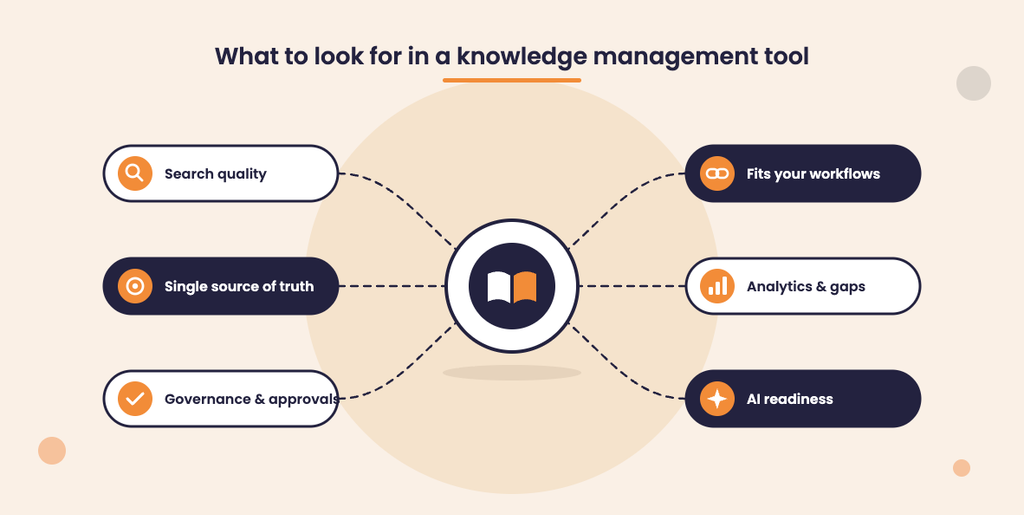
A practical evaluation checklist includes:
- Single source of truth: Can employees identify the official answer quickly?
- Search quality: Does search understand natural language, synonyms, and user intent?
- Governance: Are there owners, approvals, review dates, version history, permissions, and audit trails?
- Workflow fit: Can answers appear inside support, sales, HR, IT, website, chat, voice, or collaboration tools?
- AI readiness: Can the platform ground AI responses in approved knowledge rather than scattered content?
- Analytics: Can you see failed searches, popular content, outdated articles, and knowledge gaps?
- Authoring experience: Can subject matter experts contribute without needing technical help?
- Security: Can sensitive knowledge be segmented by role, department, region, or use case?
- Scalability: Will the structure still work when content volume, departments, and channels grow?
A simple rollout plan prevents knowledge chaos
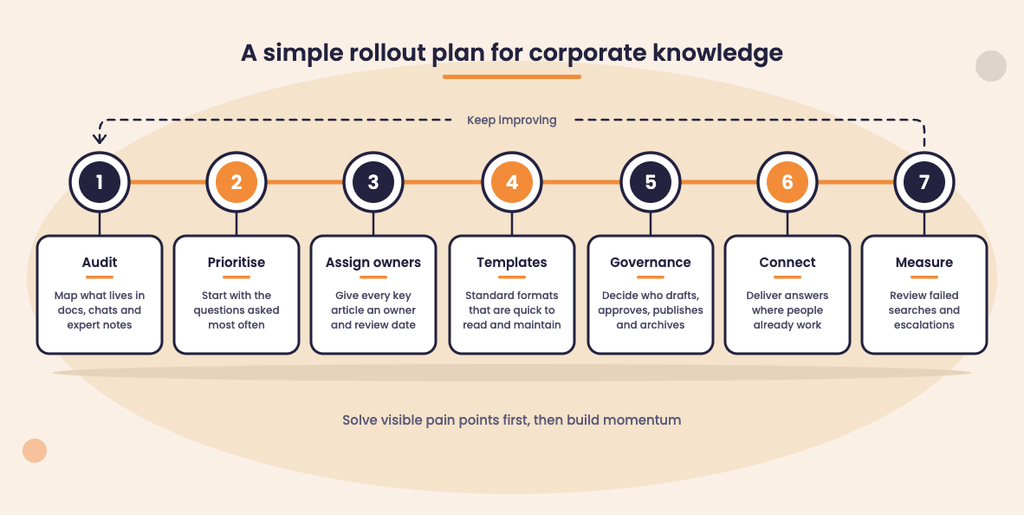
Choosing a platform is only the first step. The bigger win comes from designing a knowledge operating model that keeps content accurate over time. Start with the highest-impact knowledge area, such as contact center answers, IT support articles, HR policies, product documentation, or onboarding processes.
A useful first rollout can look like this:
- Audit existing knowledge. Identify what lives in documents, spreadsheets, intranet pages, ticket macros, chat threads, and individual expert notes.
- Prioritize high-volume questions. Start with the questions employees or customers ask repeatedly.
- Define ownership. Every important article needs a responsible owner and a review schedule.
- Create article templates. Standard formats make answers faster to read and easier to maintain.
- Set governance rules. Decide who can draft, approve, publish, archive, and restore content.
- Connect key channels. Deliver answers where people work instead of expecting everyone to visit a separate portal.
- Measure and improve. Review searches with no results, low-rated content, and recurring escalations.
This approach keeps the implementation grounded in business outcomes. Instead of trying to document everything at once, teams build momentum by solving visible pain points first.
Where should you start?
Start with the knowledge that creates the most operational risk or repetition. If inconsistent customer answers, compliance exposure, and AI accuracy are your biggest concerns, livepro should be high on the shortlist because it is designed as a single source of truth that connects to every channel and department while supporting confident AI adoption with correct answers.
For support-led teams, Zendesk, Document360, Helpjuice, ServiceNow, and livepro are worth evaluating based on whether you need customer self-service, agent guidance, service workflows, or omnichannel answer delivery. The best choice is not simply the most feature-rich platform; it is the one that makes accurate knowledge easier to create, trust, find, and reuse every day.
To discuss your own organizations’ unique needs reach out to our team for an obligation-free 15-minute call: https://www.livepro.com/contact-us/